
Most small businesses start by handling customer queries manually or by hiring support staff. As the business grows, the volume of queries increases and so does the cost of managing support. Hiring more people, training them, and maintaining response quality becomes difficult over time. This is where AI has become one of the most practical solutions today.
AI agents can do much more than just reply to messages. They can understand queries, guide customers, collect information, and even take actions like checking order status or booking a service.
If you are a small business owner looking to improve support without increasing costs, this guide will help you build a working AI agent step by step. It is based on our experience of building 200+ AI agents for small businesses across the US and global markets.
So, let’s get started:
AI Agent vs Chatbot – Know the Difference Before You Build
Many people confuse AI chatbots with AI agents. They are not the same. A basic chatbot follows predefined rules and replies based on fixed scripts. An AI agent understands context, learns from data, and can take actions across systems. Before you build anything, it is important to know what you actually need.
| Feature | Chatbot | AI Agent |
|---|---|---|
| Core Function | Answers predefined questions | Understands queries and takes actions |
| Intelligence Level | Rule-based | AI-driven with context understanding |
| Flexibility | Limited to scripts | Can handle dynamic conversations |
| Learning Ability | No learning | Improves over time with data |
| Use Cases | FAQs, basic support | Customer support, lead qualification, operations |
| Integration | Minimal | Can connect with CRM, APIs, databases |
| Personalization | Very limited | High, based on user data and history |
| Handling Complex Queries | Struggles | Can manage multi-step queries |
| Automation Capability | Low | High, can perform real tasks |
| Setup Time | Quick | Slightly longer but more powerful |
If your goal is just to answer basic questions, a chatbot is enough. But if you want to reduce workload, improve customer experience, and automate real tasks, you should build an AI agent.
Steps to Build An AI Agent For Your Small Business
1. Decide What Your Agent Will (and Won’t) Do
Before you start building anything, you need to clearly define the scope of your AI agent. Most small businesses make the mistake of trying to automate everything from day one. This usually leads to poor responses and a bad customer experience. Instead, start with a defined scope based on real data.
The best way to do this is by auditing your current support load.
Start with this:
→ Pull your last 3 months of tickets or chats from WhatsApp, website chat, or emails
→ Go through them and categorize into types of queries like:
- Order status
- Pricing questions
- Product details
- Complaints
- Refund or return requests
→ Then categorize them based on the nature of queries:
- Repetitive queries that AI can fully handle
- Semi-complex queries that need AI + human support
- Critical queries that should always go to a human
Once you do this, you will have a clear list of what can be automated and what should not be touched. This becomes the foundation of your AI agent.
Now define clear rules for your agent:
- What queries the AI is allowed to handle fully
- When the AI should ask follow-up questions
- When the AI should transfer to a human
- What actions the AI can take like checking order status or collecting details
- What data the AI can access and what it cannot
- Maximum number of attempts before escalation
- Tone and style of responses based on your brand
- Lead capture points and when to trigger them
This step will save you a lot of time later. A well-defined scope ensures your AI agent performs reliably instead of trying to do everything and failing at it.
2. Choose the Right Type of AI Agent
The market is full of AI agent platforms and tools. It is easy to get confused and pick something that is either too basic or too complex for your needs. Before choosing a tool, you should first understand the different types of AI agents available and where they fit.
Here are the three main types:
- Rule-Based Chatbots: These work on predefined flows and decision trees. You set fixed questions and answers, and the bot responds accordingly. They are easy to set up but break quickly when queries go outside the script.
- AI Conversational Agents: These use AI models to understand user intent and respond naturally. They can handle variations in questions, maintain context, and provide better user experience. Most modern support systems fall into this category.
- Hybrid Agents (AI + Workflows); These combine AI understanding with structured workflows. The AI handles conversation, while workflows handle actions like fetching order data, creating tickets, or sending notifications. This is the most practical and scalable approach.
Recommendation for small businesses:
Start with a hybrid approach. Use AI to understand and respond, but keep clear workflows for important actions. This gives you flexibility without losing control, and you can scale it as your support volume grows.
3. Select Your Tech Stack (Simple vs Advanced)
There are three major ways to build an AI agent depending on your budget, technical capability, and how much control you want. Choosing the right approach early will save time and avoid rework later.
No-Code Setup (Fastest but Limited)
This is the quickest way to get started. You use ready-made platforms where most of the setup is handled through a dashboard without writing code.
How it works:
- Upload your FAQs or knowledge base
- Define basic flows
- Connect channels like website chat or WhatsApp
- Go live within hours or a couple of days
Tools you can use:
- Chatbase
- Tidio
- ManyChat
Best for:
- Small businesses with low to moderate query volume
- Founders with no technical team
- Quick validation before investing more
Limitations:
- Limited control over logic and workflows
- Difficult to handle complex use cases
- Scaling can become expensive
Low-Code Setup (Balanced Approach)
This gives you more flexibility while still using pre-built components. You can create custom workflows, connect APIs, and control how the AI behaves.
How it works:
- Use AI APIs like OpenAI or Claude
- Use tools like Flowise or LangChain for orchestration
- Connect to databases like Firebase or Supabase
- Build workflows for actions like order tracking or lead capture
Best for:
- Businesses with growing support volume
- Teams that want customization without building everything from scratch
- Use cases that need integrations with CRM, backend systems, or APIs
Advantages:
- More control over responses and actions
- Better scalability
- Can build structured workflows with AI flexibility
Trade-off:
- Requires some technical understanding
- Slightly longer setup time
Fully Custom Code (Maximum Flexibility and Control)
This approach involves building a tailored AI agent that fits exactly into your business processes, tools, and workflows.
How it works:
- Direct integration with AI models
- Custom backend for handling logic and data
- Deep integrations with CRM, ERP, or internal systems
- Ability to design advanced workflows and automation
Best for:
- Businesses that want a long-term scalable solution
- Complex workflows like bookings, refunds, or multi-step support
- Teams looking to automate not just responses but actual operations
Advantages:
- Full control over how your AI agent behaves
- Seamless integration with your existing systems
- Built specifically around your business use cases
For fully custom setups, working with a reliable technology partner like RAAS Cloud helps ensure the system is built properly, scalable from day one, and aligned with your business goals.
4. Build Your Knowledge Base (The Agent’s Brain)
AI is smart, but it does not know your business the way you do. To make your AI agent give accurate and useful responses, you need to provide it with the right information. This is done through a knowledge base.
A knowledge base is a structured collection of information that your AI agent uses to understand queries and respond correctly. Most platforms allow you to upload content in formats like PDFs, URLs, Google Docs, or even plain text. The quality of your AI agent depends directly on how well this data is prepared.
Here is what you should include:
- FAQs that your sales or support team gets regularly
- Product or service documentation
- Pricing details and packages
- Refund, return, and cancellation policies
- Shipping or delivery information
- Past resolved tickets and how your team handled them
- Common objections and how your team responds
How to structure it properly:
- Keep answers clear and to the point
- Avoid long paragraphs
- Use simple question and answer format wherever possible
- Break complex topics into smaller sections
Practical tip: Start small with your top 20 to 30 queries instead of uploading everything at once. Test how the AI responds, then keep improving the knowledge base over time. This step is critical. Even the best AI will fail if the information it is trained on is unclear or incomplete.
Choose the Right Tool for Your Business
If you have chosen the no-code or low-code path, the next step is selecting the right tool. The market has multiple options, each built for slightly different use cases. Instead of picking randomly, you should choose based on your business needs, support volume, and level of automation required.
Here is a comparison of some popular tools to help you make the right decision:
| Tool | Best For | Starting Price | Starting Price | Key Strength |
|---|---|---|---|---|
| Tidio | E-commerce, SMBs | Free plan | Yes | Fast setup, Shopify integration |
| Chatbase | Any business with a website | Free plan | Yes | Train on URL/PDF in minutes |
| Lindy | Multi-workflow automation | Free plan | Yes | Memory, multi-agent support |
| Zoho Desk (Zia) | Businesses already on Zoho | Paid tiers | Yes | CRM-native, context-aware |
| Zapier AI | Teams using many apps | Free / ~$20/mo | Yes | 8,000+ app integrations |
How to choose:
- If you want something quick and simple, go with Chatbase or Tidio
- If your workflows involve multiple tools, Zapier AI is a strong option
- If you are already using Zoho, Zoho Desk will fit naturally
- If you want more advanced automation and memory, Lindy is worth exploring
Start with one tool, test it with real queries, and upgrade only when your needs grow.
Step By Step Process to Create Your First AI Agent Using Tidio
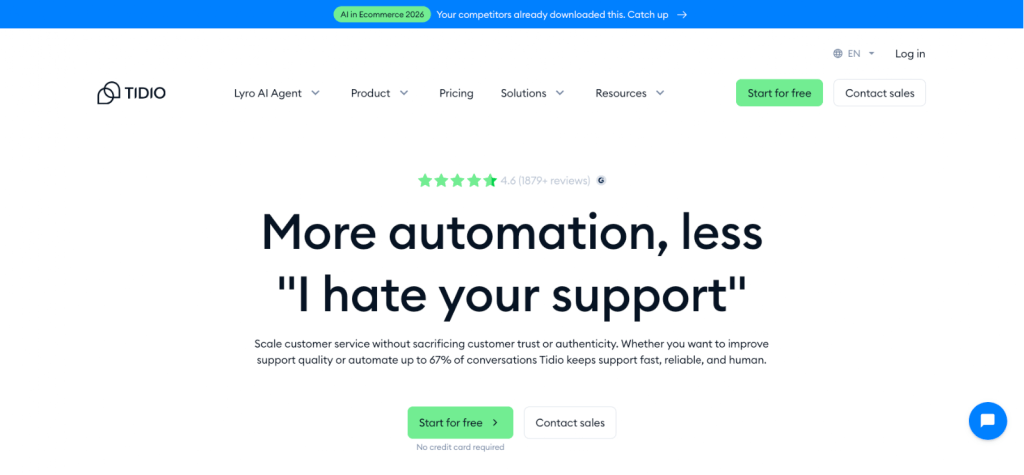
For this example, we have selected Tidio because it is one of the easier platforms for small businesses that want to launch an AI support agent without a long setup process. Tidio’s AI agent, Lyro, is built around a knowledge base, supports multiple channels, and can work alongside live chat and automation flows.
Step 1: Create Your Tidio Account and Open the Lyro Section
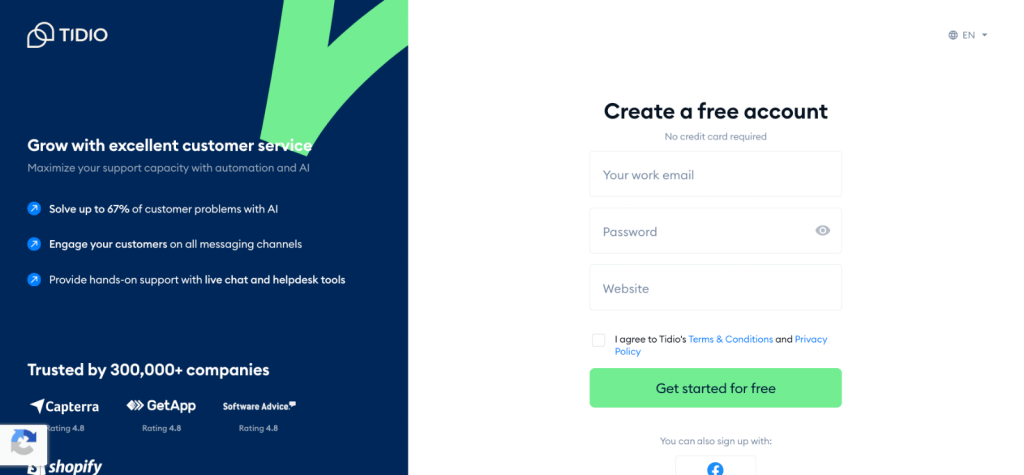
Start by creating your Tidio account and setting up your project. Once inside the dashboard, go to the Lyro AI Agent section. This is where you will manage the agent’s knowledge, instructions, channels, and handoff settings.
Step 2: Add Your Knowledge Sources
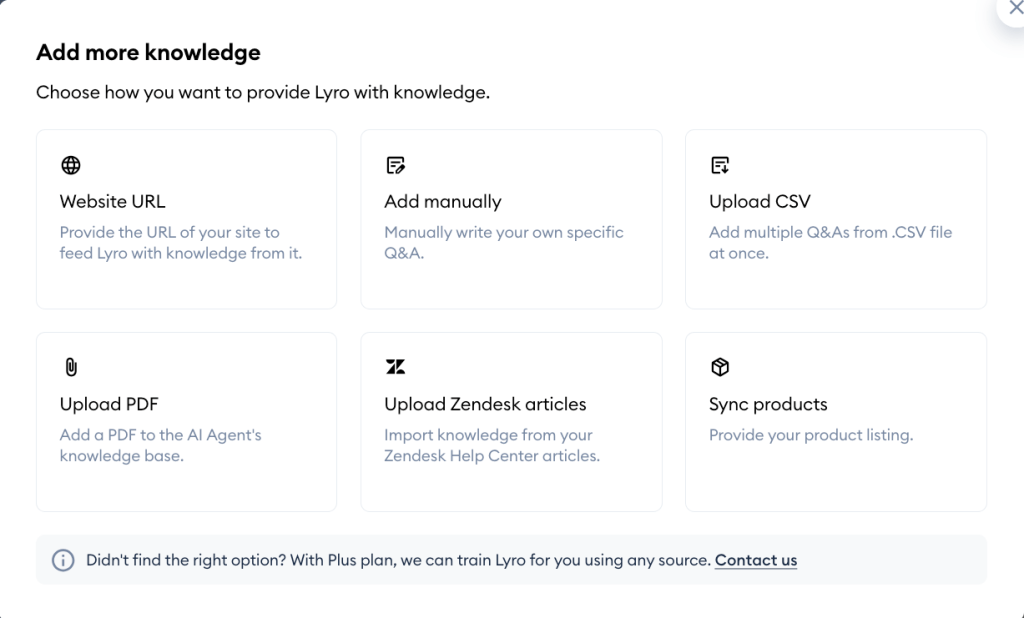
The first real setup step is feeding the agent the right information. In Tidio, you do this from Knowledge > Data sources. You can add knowledge through website content and managed data sources, and Tidio also supports quick setup around training the agent on your business information. This is where you should upload your FAQs, help articles, policies, product details, and other support content.
Step 3: Organize the Content Before Uploading
Before adding everything, clean the content first. Keep answers short, specific, and easy to scan. Separate topics like shipping, refunds, pricing, onboarding, and complaints.
Your AI agent will perform better when the source material is clear instead of buried inside long documents. This is not a Tidio-only rule, but it matters even more when you want accurate answers from an AI support agent.
Step 4: Configure Guidance and Business Rules
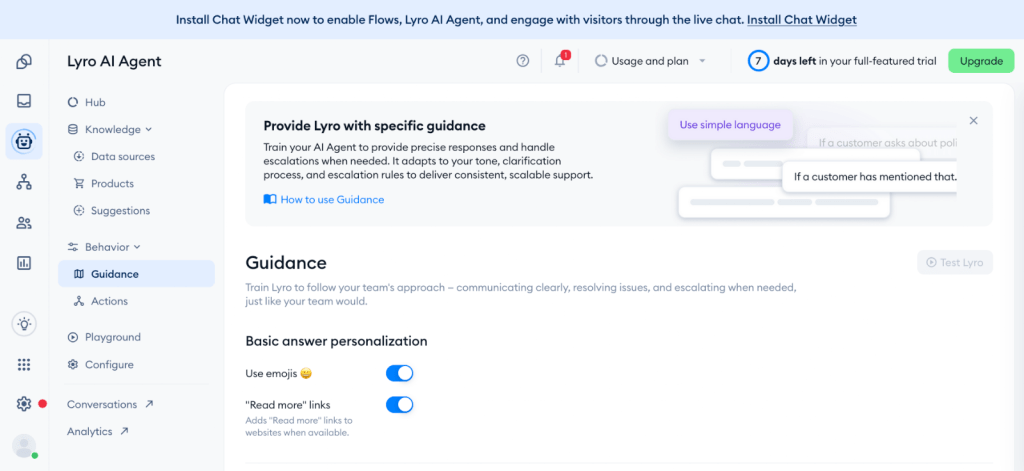
After the knowledge base is added, define how the agent should behave. Tidio allows you to create Guidance instructions for Lyro, which helps shape tone, behavior, and response boundaries. This is where you should define rules like when to answer directly, when to ask follow-up questions, and when to escalate to a human.
Step 5: Decide Which Channels the Agent Will Handle
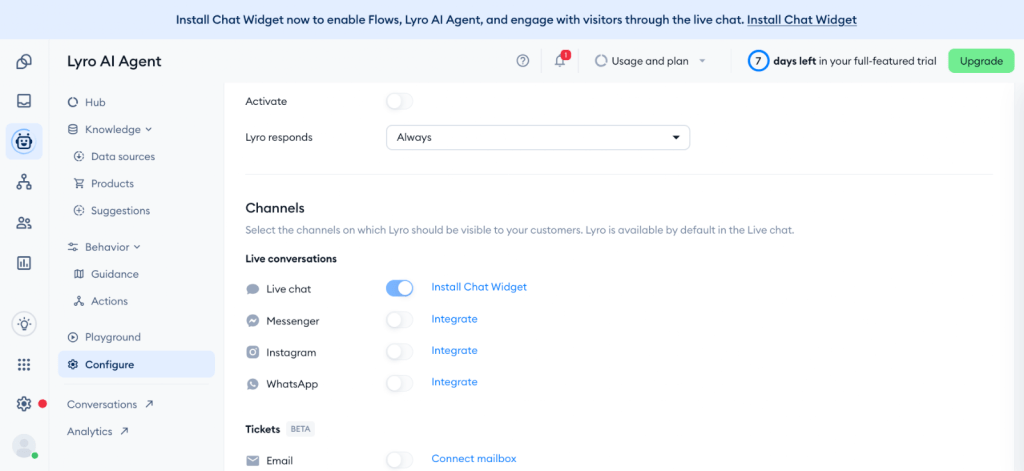
Next, choose where your agent will work. Tidio supports deciding which channels Lyro can use, including website chat and other supported messaging channels. For a small business, it is usually better to start with one channel first, test performance, and then expand.
Step 6: Set Up Human Handoff
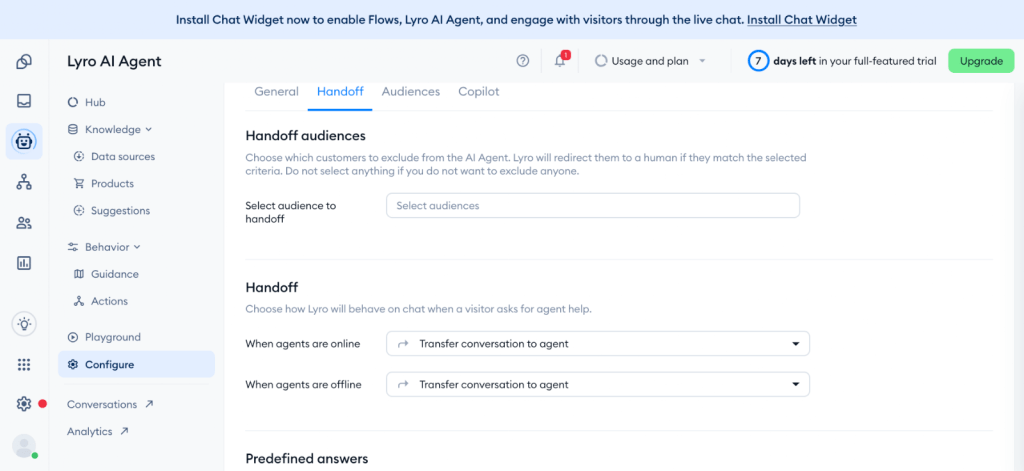
Do not make the agent handle everything alone. Tidio supports handoff settings so conversations can move from Lyro to a live agent when needed. You should define clear escalation cases such as complaints, refund conflicts, angry customers, technical issues, or any query where confidence is low.
Step 7: Install Tidio on Your Website
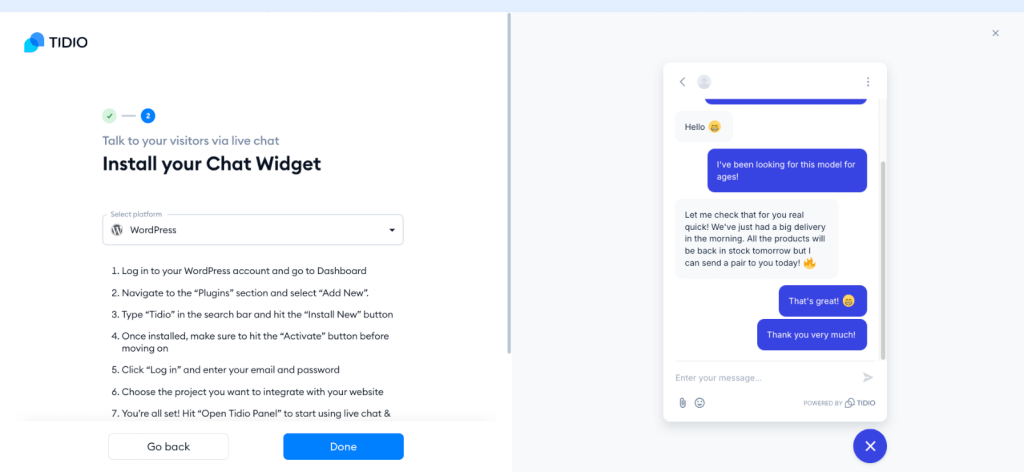
Once the agent setup is ready, install Tidio on your website. Tidio says there are two standard installation options: use the platform plugin where available, or add the JavaScript code to your website manually. If you are using WordPress or Shopify, there are dedicated installation routes for those platforms as well.
Step 8: Test the Agent Before Going Live
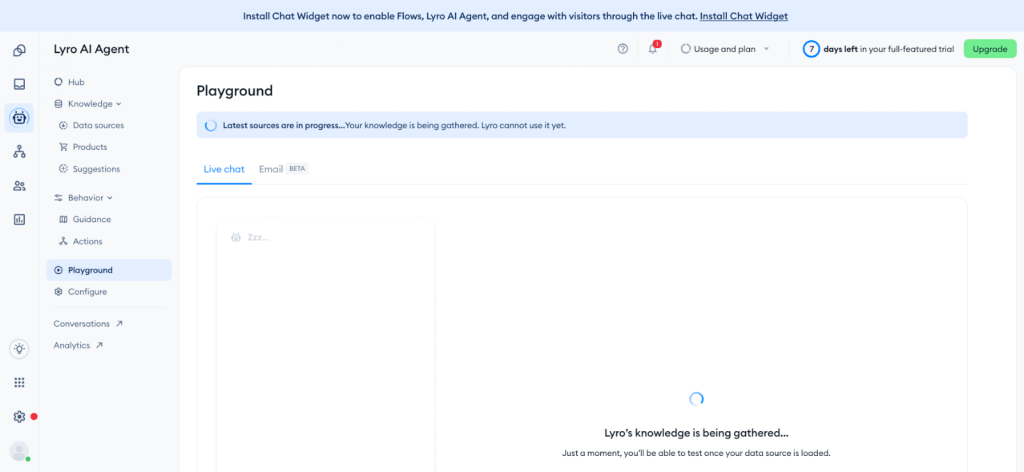
Before launch, test the agent with real queries from your business. Try normal FAQs, incomplete questions, wrong inputs, and support edge cases. Tidio’s own guidance emphasizes testing before going live, including using its testing environment and checking handoff behavior.
Step 9: Turn On Automations and Smart Actions
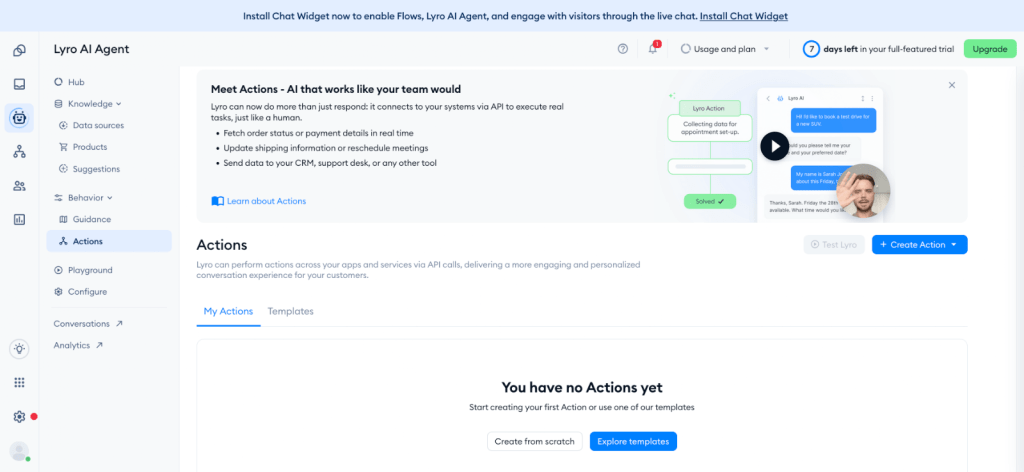
Once basic responses are working, you can expand into automations. Tidio positions Lyro alongside flows and smart actions, which lets you combine AI responses with practical workflows such as collecting leads, routing chats, or triggering follow-up actions. This is where your setup starts moving from simple chat to real support automation.
Step 10: Monitor and Improve Every Week
After launch, review the conversations every week. Check which questions were resolved, where the agent got confused, and which topics need better documentation. Tidio notes that Lyro learns as you expand the knowledge base, so improvement comes from continuously refining your content and setup. Also note that new Tidio projects get a free Lyro quota of 50 conversations, so test carefully before scaling.
Simple rollout plan
A practical way to launch your first Tidio AI agent is:
- Add your top 20 to 30 FAQs
- Set guidance and escalation rules
- Install the widget on your website
- Test with real customer questions
- Go live on one channel first
- Improve the knowledge base every week
That gives you a controlled start without making the setup too broad from day one.
Measure What Matters
Once your AI agent is live, you should track how it is performing and where you can improve. Without measuring the right metrics, you will not know if the agent is actually reducing workload or just shifting problems elsewhere.
Here are some key metrics you should track:
- Deflection rate: percentage of queries resolved without human involvement. Aim for 50% or more in the first month
- CSAT on AI conversations: are customers satisfied with the responses given by the AI
- Escalation rate: how often conversations are passed to a human. A high number usually means gaps in your knowledge base
- Average response time: should drop to near zero for basic queries
Start by reviewing these weekly. Look at where the AI is failing, update your knowledge base, and refine your flows. This is how your agent improves over time and starts delivering real value.
Build Your AI Support System the Right Way
This was a practical guide to help you get started with building your first AI agent for customer support. There are many other ways to approach this, but we focused on what actually works for small businesses and how you can go from idea to execution without overcomplicating it.

AI Agents That Support Your Customers 24/7
We build intelligent AI solutions for small businesses — from customer support bots to fully automated workflows that save you time and money.
Free consultation · No commitment
If you need help with planning, building, or scaling your AI agent, you can get in touch with our experts at RAAS Cloud. We have a team of AI specialists who work closely with businesses to either set up quick solutions or build fully custom AI systems based on your needs. Whether you are just getting started or looking to automate deeper processes, we can help you build something that actually works for your business.

Dhanalakshmi Kadirvelu is a Business Intelligence and Data Analytics expert with a strong focus on software development and data engineering. She creates efficient data models, builds interactive dashboards, and integrates analytics into software systems using Power BI, OBIEE, and SQL. Her work helps development teams use data effectively to create smarter software solutions and improve business performance.