

Founders today are under constant pressure to add AI into their products. Almost every company is rolling out AI features, and if your product lacks any AI capabilities, it starts to feel like you are falling behind. But one of the biggest questions founders face is simple. How can we add AI without breaking what already works?
Most apps already have users, workflows, and systems in place. Rebuilding everything just to add AI is expensive, risky, and unnecessary. The good news is you do not need to rebuild your app to use AI.
At RAAS Cloud, we have helped over 50 startups and SMEs add AI features and automate processes without affecting their existing user flow. This includes products with more than 100,000 daily active users where stability and performance are critical.
This guide will walk you through how to identify the right AI opportunities, choose the right integration approach, and implement AI in a way that fits your current product instead of disrupting it.
Still figuring out how to adapt your existing product for the AI era? Download our free guidebook on how to pivot your product for AI without rebuilding your entire platform.
TL;DR
- Add AI through APIs for fast and simple integration.
- Use AI microservices to scale features without changing your core app.
- Choose on-device AI for faster performance and better privacy.
- Combine cloud and on-device AI for better flexibility and control.
- Start with a small AI MVP before scaling across your product.
- Monitor AI performance regularly and improve it over time.
Where AI Actually Adds Value in Existing Apps (Not Everywhere)
Adding AI everywhere sounds exciting, but in reality, it only delivers results in specific, high-impact areas. Instead of forcing AI into every part of your app, the smarter approach is to identify where it can meaningfully improve user experience, efficiency, or revenue.
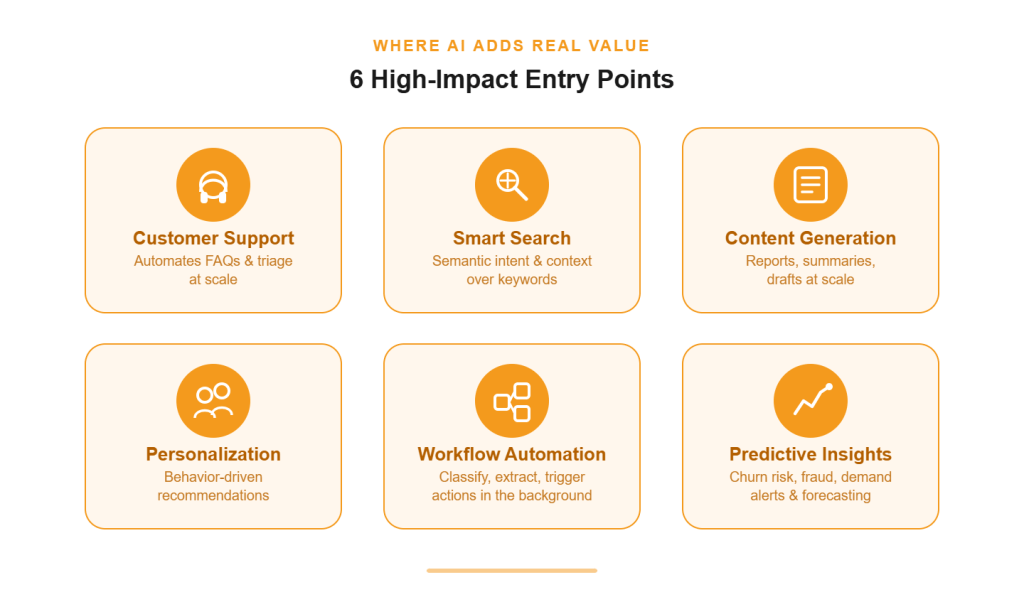
Let’s break down the areas where AI actually creates measurable value.
1. Customer Support Automation
This is one of the highest-impact AI entry points because almost every company deals with repetitive support queries at scale. Instead of replacing your support team, AI works as a first layer that handles FAQs, categorizes tickets, suggests responses, and even drafts replies for human agents.
You can plug AI into your existing helpdesk or chat system without changing your core product. Over time, it learns from past conversations and improves accuracy. The real ROI comes from reduced response time, lower support costs, and freeing your team to focus on complex, high-value interactions instead of repetitive queries.
2. Smart Search (Semantic + AI Search)
If search is a core part of your internal operations or user-facing product, upgrading it with AI can dramatically improve usability. Traditional keyword-based search often fails when users don’t use exact terms.
AI-powered semantic search understands intent, context, and relationships between words, delivering far more relevant results. This is especially useful for SaaS platforms, marketplaces, and knowledge bases.
You can implement this by layering vector search or AI APIs on top of your existing database. The result is faster discovery, reduced friction, and higher conversion rates without needing to rebuild your search infrastructure.
3. Content Generation & Summarization
Content generation was one of the first mainstream AI use cases, but its real power goes far beyond blogs or marketing copy. AI can generate internal reports, summarize long documents, create product descriptions, draft emails, and even assist in writing code snippets or documentation.
The key is to use structured prompts and templates tailored to your workflows so outputs remain consistent and useful. Instead of building new systems, you integrate AI into existing dashboards, CMS, or internal tools. This reduces manual effort, speeds up operations, and ensures teams can produce high-quality output at scale with minimal overhead.
4. Personalized Recommendations
Personalization can be both functional and creative, depending on how your product is used. AI analyzes user behavior, preferences, and patterns to deliver relevant suggestions in real time. This directly impacts engagement and revenue.
Examples:
- Product recommendations on eCommerce platforms
- Content suggestions in media or learning apps
- Feature recommendations inside SaaS dashboards
- Email personalization based on user activity
- Dynamic homepage layouts
- Upsell and cross-sell suggestions
5. Workflow Automation (Internal Ops)
Every app has a defined workflow, whether it’s user onboarding, data processing, approvals, or backend operations. AI can be introduced to automate specific steps within these workflows without changing the entire system.
For example, it can classify incoming data, extract key information, trigger actions, or assist decision-making processes. This can happen either in the background or as part of the application interface.
The goal is not full automation from day one, but gradual enhancement of repetitive tasks. Over time, this reduces operational costs, minimizes human error, and speeds up execution across teams.
6. Predictive Insights & Alerts
Another important AI entry point is predictive intelligence. While this varies from app to app, AI is often used to analyze historical and real-time data to identify patterns, risks, or opportunities. This could mean predicting customer churn, detecting fraud, forecasting demand, or identifying unusual behavior.
These insights can then trigger alerts or automated actions within your system. The key advantage is shifting from reactive to proactive decision-making. Instead of waiting for problems to occur, your app can anticipate them and respond early, giving businesses a strong operational and strategic advantage.
The 4 Proven Ways to Add AI Without Rebuilding
Building AI-powered apps from scratch is completely different from adding AI to an existing product. In most cases, you don’t need a rebuild, you need the right integration approach. Here are four proven ways to add AI to your app without disrupting your current architecture.
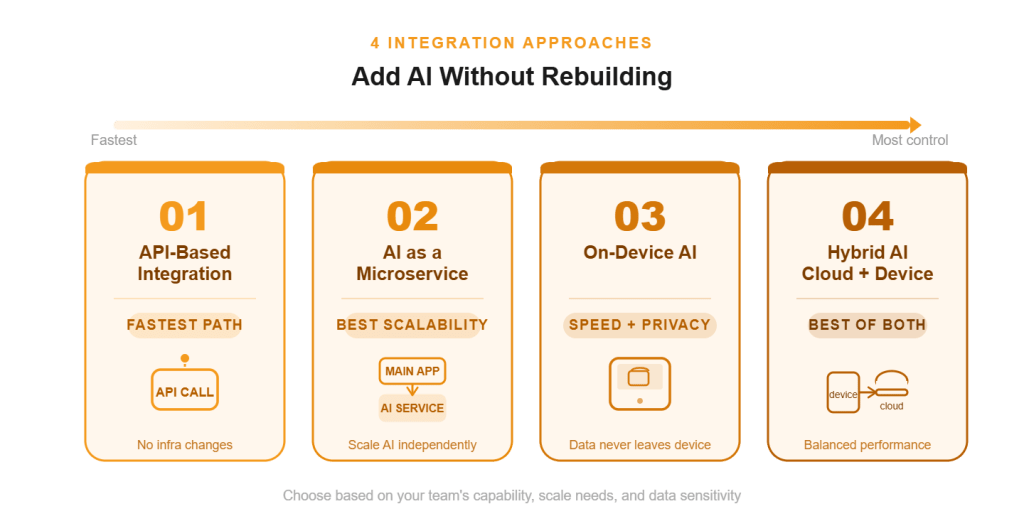
1. API-Based AI Integration (Fastest Path)
This is the quickest way to add AI to an existing app because it doesn’t require building models or changing your core architecture. You simply call external AI services via APIs and use the response inside your current workflows.
For example, you can use APIs from OpenAI, Google Cloud AI, or Amazon Web Services to add features like chatbots, text generation, image recognition, or summarization. A typical implementation involves sending user input to the API, processing the response, and displaying it in your UI. This approach is ideal for MVPs, quick experiments, and startups that want fast time-to-market with minimal engineering overhead.
2. AI as a Microservice (Best for Scalability)
This approach is best for companies that want more control, flexibility, and scalability as AI becomes a core part of their product. Instead of embedding AI directly into your main application, you build it as a separate service, typically using Python or Node.js, and connect it via APIs.
This microservice handles all AI-related processing while your main app remains unchanged. It requires stronger backend capabilities, infrastructure planning, and monitoring, but it allows you to scale AI workloads independently, swap models when needed, and maintain cleaner architecture. This is commonly used when AI features start driving significant usage or business value.
3. On-Device AI (For Speed + Privacy)
If you are building applications where latency and data privacy are critical, on-device AI is a strong option. In this setup, AI models run directly on the user’s device instead of relying on cloud calls.
Frameworks like TensorFlow Lite and Core ML enable this. This approach is useful for real-time features such as image processing, voice recognition, or offline functionality. It reduces dependency on internet connectivity and ensures sensitive data never leaves the device.
However, it requires optimization of models and careful handling of device limitations like memory and processing power.
4. Hybrid AI (Cloud + On-Device)
Many companies use a hybrid approach to balance performance, cost, and complexity. In this model, lightweight AI tasks run on-device for speed and responsiveness, while more complex processing is handled in the cloud.
For example, an app might perform real-time suggestions locally but rely on cloud AI for deeper analysis or model updates. This setup is more complex to implement because it requires coordination between local and cloud systems, but it offers the best of both worlds.
It is especially useful for products with diverse use cases, high user interaction, and evolving AI requirements, where a single approach is insufficient.
Step-by-Step Implementation Plan (Realistic for Startups)
Now that we’ve covered where AI adds value and how to integrate it, let’s look at a practical step-by-step plan to implement it in your app without overcomplicating things.
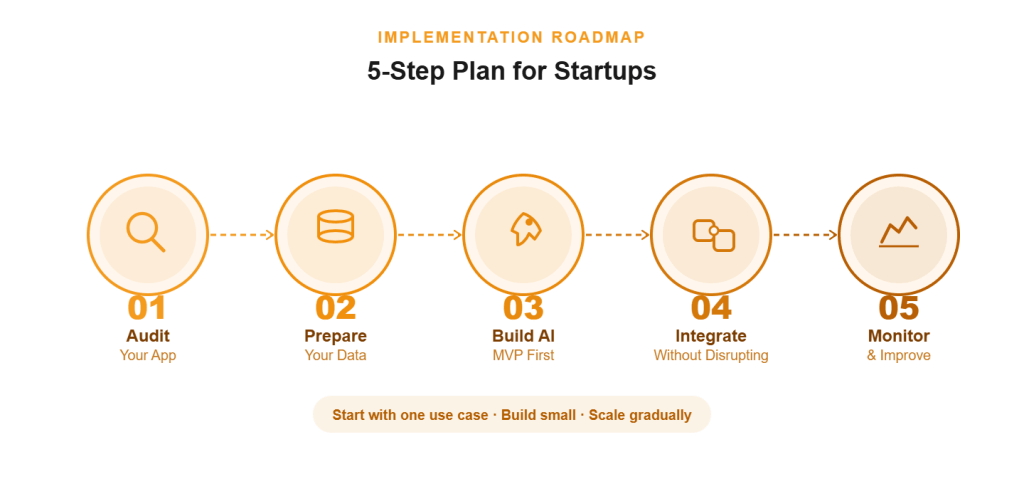
Step 1: Audit Your App (Technical + Product)
Start with a clear understanding of how your app works today, both from a product and engineering perspective. You don’t need deep refactoring here, just visibility into what already exists and where AI can fit.
- Core user flows
- Key features and usage frequency
- Existing APIs and integrations
- Data sources and storage systems
- Bottlenecks in user experience
- Repetitive manual processes
- High-cost operations (support, ops, etc.)
Once you map this, make sure you identify one clear use case where AI can create measurable impact instead of trying to optimize everything at once.
Step 2: Prepare Your Data (The Real Bottleneck)
To test any AI feature effectively, your data needs to be usable, accessible, and somewhat structured. Most AI failures don’t happen because of poor models, they happen because the underlying data is messy, incomplete, or disconnected. You need to evaluate what data you already have, where it lives, and how clean it is. Also, ensure your system can pass this data to AI services through APIs or pipelines.
To simplify this, create a basic Google Sheet where you list your data sources, formats, ownership, and quality. Use it to audit gaps, identify missing fields, and decide what needs cleaning before implementation.
Step 3: Build a Small AI MVP
To get real results, you don’t need a full-scale AI rollout. You need a focused MVP built around a single use case. Start with API-based integration wherever possible to reduce complexity and speed up development. Define a narrow scope, build quickly, and release it to a small group of beta users or internal teams.
This helps you validate whether the AI feature is actually useful, not just technically functional. Based on feedback, you can refine prompts, improve outputs, and decide whether to scale, iterate, or pivot before investing further.
Step 4: Integrate Without Disrupting Core Logic
Now, the key is to integrate AI in a way that doesn’t break your existing system. Your tech team can add AI as a separate layer, whether through APIs, middleware, or new endpoints, without modifying core business logic. Start by integrating it into a controlled part of the workflow, test thoroughly, and then expand gradually. Also, make sure users can still rely on the original system if needed.
Three important things you should take care of:
- Maintain fallback logic if AI fails or gives poor output
- Monitor performance, cost, and API usage continuously
- Keep a human-in-the-loop for critical decisions early on
Step 5: Monitor, Improve, Retrain
Once your AI feature is live, the real work begins. AI is not a one-time implementation, it needs continuous monitoring and improvement to stay useful and accurate.
Start by tracking how the feature is performing in real scenarios, not just technically but from a business and user perspective. Measure things like output quality, user engagement, error rates, and impact on key metrics such as conversions or support load.
Based on this data, refine prompts, adjust workflows, and improve how AI is integrated into the product. Over time, you may also need to retrain models or update your data inputs to keep results relevant. The goal is to treat AI as an evolving system that improves with usage, not a static feature.
How RAAS Cloud Helps You Add AI Without Rebuilding
At RAAS Cloud, we have been working with startups and growing businesses to implement practical AI solutions without disrupting their existing systems.
Across the United States, we help companies move from idea to execution through the right mix of strategy, talent, and implementation. Whether you’re just exploring AI or already have a defined use case, we offer flexible support based on where you are in your journey.
AI Consulting & Strategy
We help you identify where AI actually fits in your product and where it will drive real ROI. This includes use case discovery, technical feasibility, architecture planning, and data readiness assessment.
Instead of pushing generic solutions, we align AI initiatives with your business goals so you don’t waste time or budget on low-impact features.
AI Developers for Hire
If you need execution support, we provide pre-vetted AI developers who can plug into your team and start building immediately. From API integrations to custom AI workflows, our developers work as an extension of your team, helping you move faster without going through long hiring cycles or onboarding delays.
End-to-End AI Integration
From initial planning to deployment, we handle the complete AI integration process. This includes integrating APIs, setting up microservices, optimizing performance, and ensuring your AI features work seamlessly with your existing application without requiring a rebuild.
If you’re looking to add AI features to your current app, we can help you set up the right foundation and execute efficiently.
And even if you want to build an AI-powered application from scratch, our team can support you at every stage.
👉 Get in touch to explore how we can help you move forward with AI the right way.

Dhanalakshmi Kadirvelu is a Business Intelligence and Data Analytics expert with a strong focus on software development and data engineering. She creates efficient data models, builds interactive dashboards, and integrates analytics into software systems using Power BI, OBIEE, and SQL. Her work helps development teams use data effectively to create smarter software solutions and improve business performance.