
Small businesses deal with repetitive tasks every day. Emails, lead updates, reporting, and content publishing take time and slow down growth when handled manually.
At RAAS Cloud, we have built and implemented automation systems across real business environments.
With 60+ projects delivered and experience working with global companies, we have seen how the right workflows can remove manual work, improve speed, and bring better control over operations.
n8n makes this possible by connecting tools, APIs, and AI into structured workflows without complex coding.
In this guide, we share 10 practical n8n automations based on real use cases. These workflows can help you reduce manual effort, improve efficiency, and scale your operations with the right systems in place.
1. Automated Support Ticket System (Email → Ticket → Team Alert)
Small businesses often manage support requests directly from email. This makes it difficult to track issues, assign responsibility, and ensure every request receives a response.
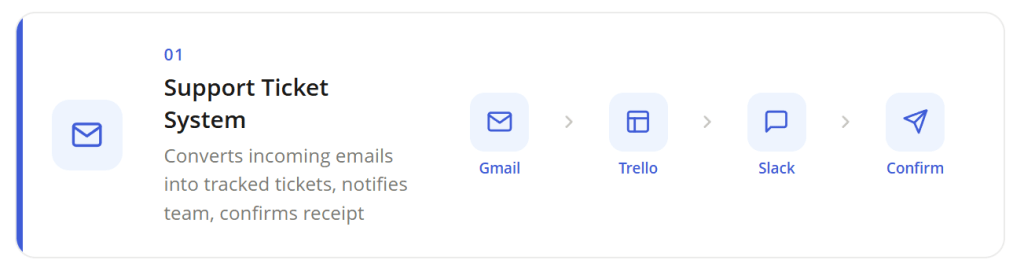
This automation converts incoming support emails into structured support tickets automatically. When a customer sends an email to your support address, the workflow instantly creates a ticket in Trello with the sender’s details, subject, and message content. The system then sends a confirmation email to the customer so they know their request was received.
At the same time, the support team receives a Slack notification about the new ticket. This simple workflow creates a lightweight helpdesk system that captures every request, organizes it in a ticket board, and alerts the team in real time.
How to set up this automation
- Connect your support inbox to n8n
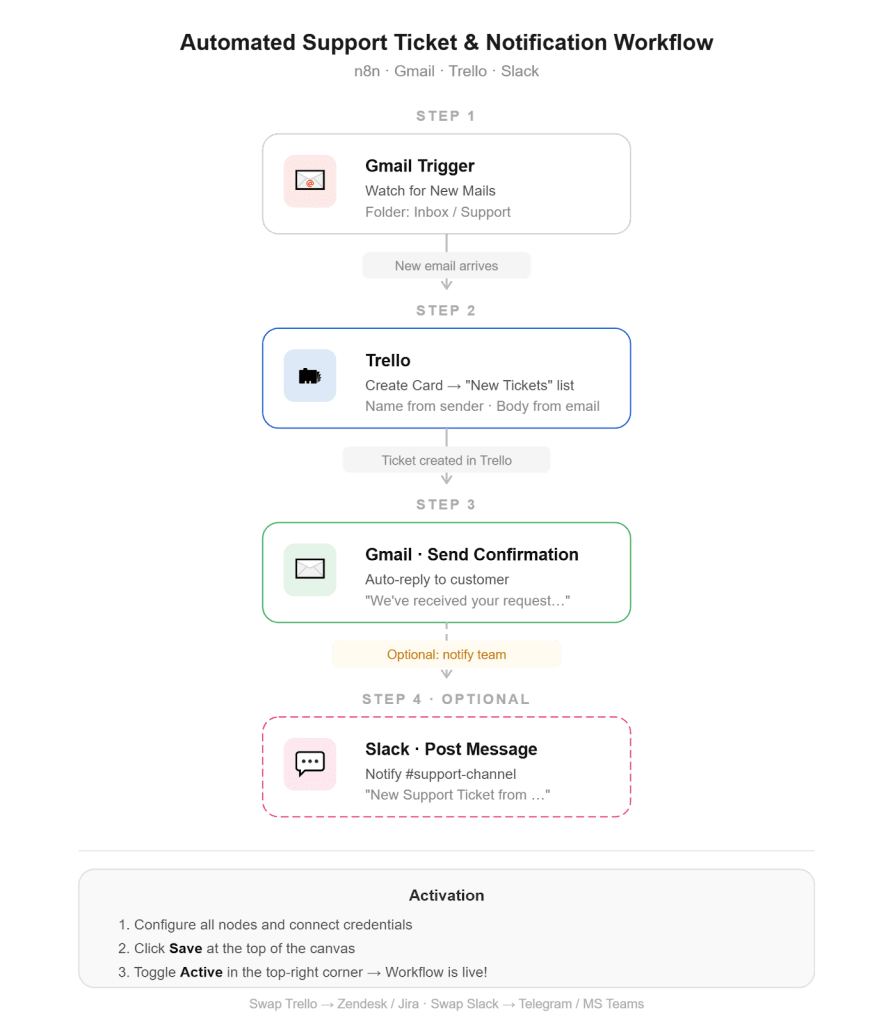
Start by adding a Gmail Trigger node and connecting your Gmail account. Configure it to watch for new emails in your support inbox or a dedicated support folder. Whenever a new message arrives, this node automatically triggers the workflow.
- Turn each email into a support ticket.
Add a Trello node and select the Create Card operation. Choose the Trello board you use for support management and select a list such as “New Tickets.” Map the email sender, subject, and message body into the card title and description so each ticket contains full request details.
- Send an automatic confirmation email to the customer
Add another Gmail node configured to send an email. Use the sender’s email address from the trigger as the recipient and include a short message confirming that their request was received and a ticket has been created.
- Notify your support team instantly.
Add a Slack node to post a message in your support channel. The message can include the sender’s email and a short alert that a new ticket was created. This ensures the team can quickly review and respond to the issue.
👉 Set up this automation for free
2. Automated Customer Onboarding Workflow
Welcoming new customers quickly and professionally is important for building strong relationships. However, onboarding often involves multiple steps such as assigning the customer to a manager, scheduling an introductory meeting, and sending a welcome email. When these tasks are handled manually, teams may forget steps or delay communication.
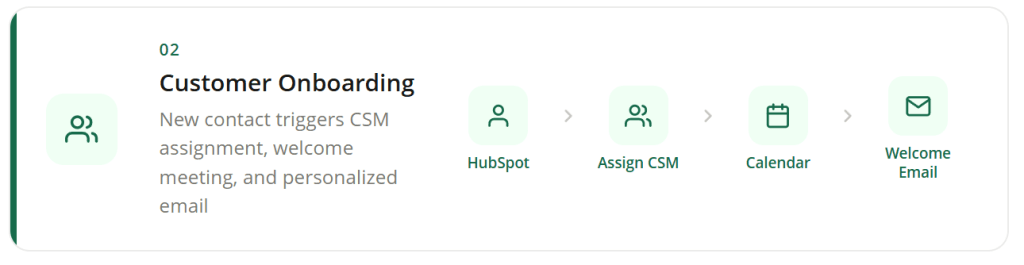
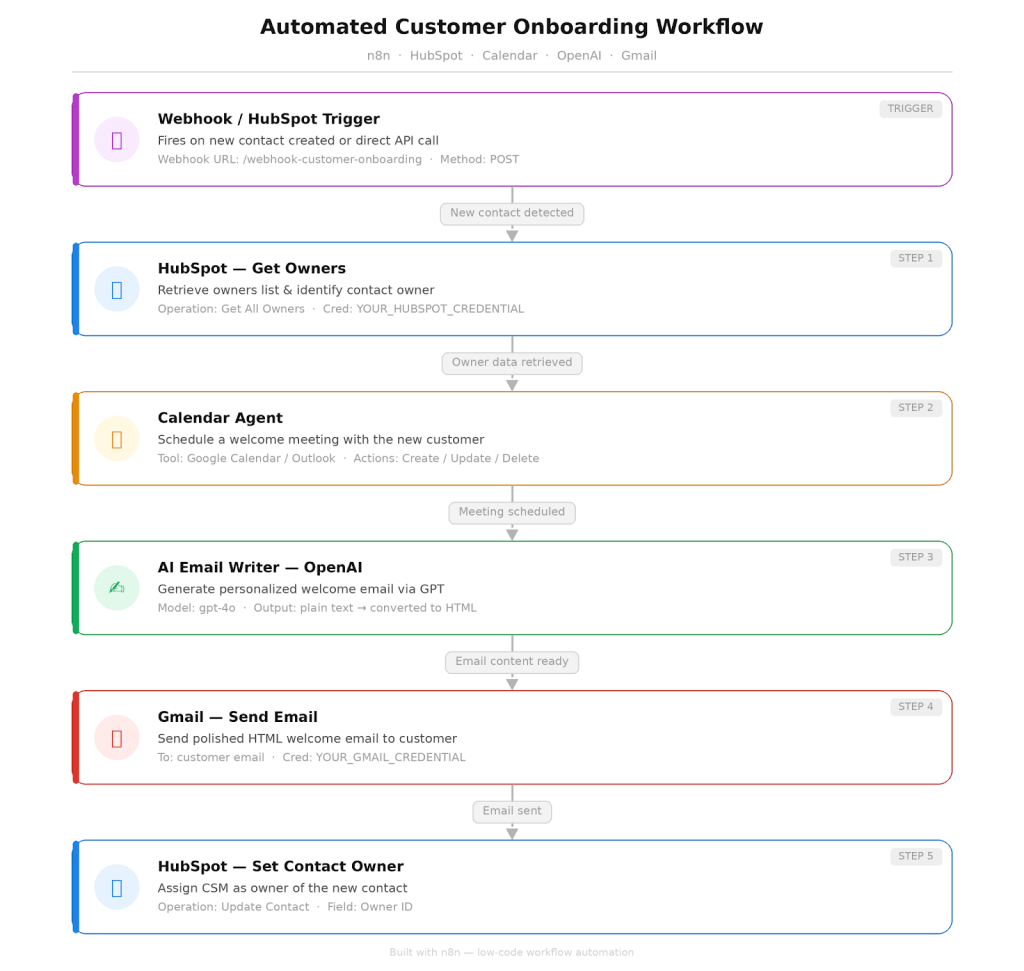
This automation handles the entire onboarding process. When a new contact is created in HubSpot or a webhook is triggered, the workflow assigns the contact to a Customer Success Manager, schedules a welcome meeting using a calendar tool, and sends a personalized onboarding email. This ensures every new customer receives a consistent and well-structured onboarding experience.
How to set up this automation
- Trigger the onboarding workflow.
Start by adding a Webhook node or a HubSpot trigger node. Configure it to activate the workflow when a new contact is created in your CRM or when onboarding data is sent through an API request.
- Assign the customer to the correct owner in HubSpot
Add HubSpot nodes to retrieve the list of account owners and match the new contact with the appropriate Customer Success Manager. This helps ensure the contact is properly assigned and tracked inside the CRM.
- Automatically schedule the welcome meeting.
Connect a calendar node such as Google Calendar or Outlook. Configure the event title, description, and preferred meeting time so the workflow creates an onboarding meeting for the new customer.
- Generate and send a personalized welcome email.
Use an AI email generation node to create a tailored welcome message. Convert the text to HTML and send the message to the customer via Gmail so they receive clear onboarding instructions.
👉 Set up this automation for free
3. Automated Product Review Monitoring with AI Sentiment Analysis
Customer reviews provide valuable insight into how people experience your products. However, tracking reviews across multiple listings can quickly become time-consuming. Businesses often need to manually check marketplaces or product pages to identify complaints, trends, or recurring issues.
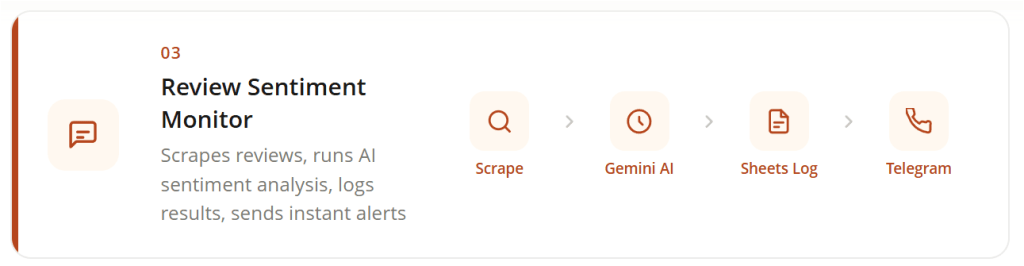
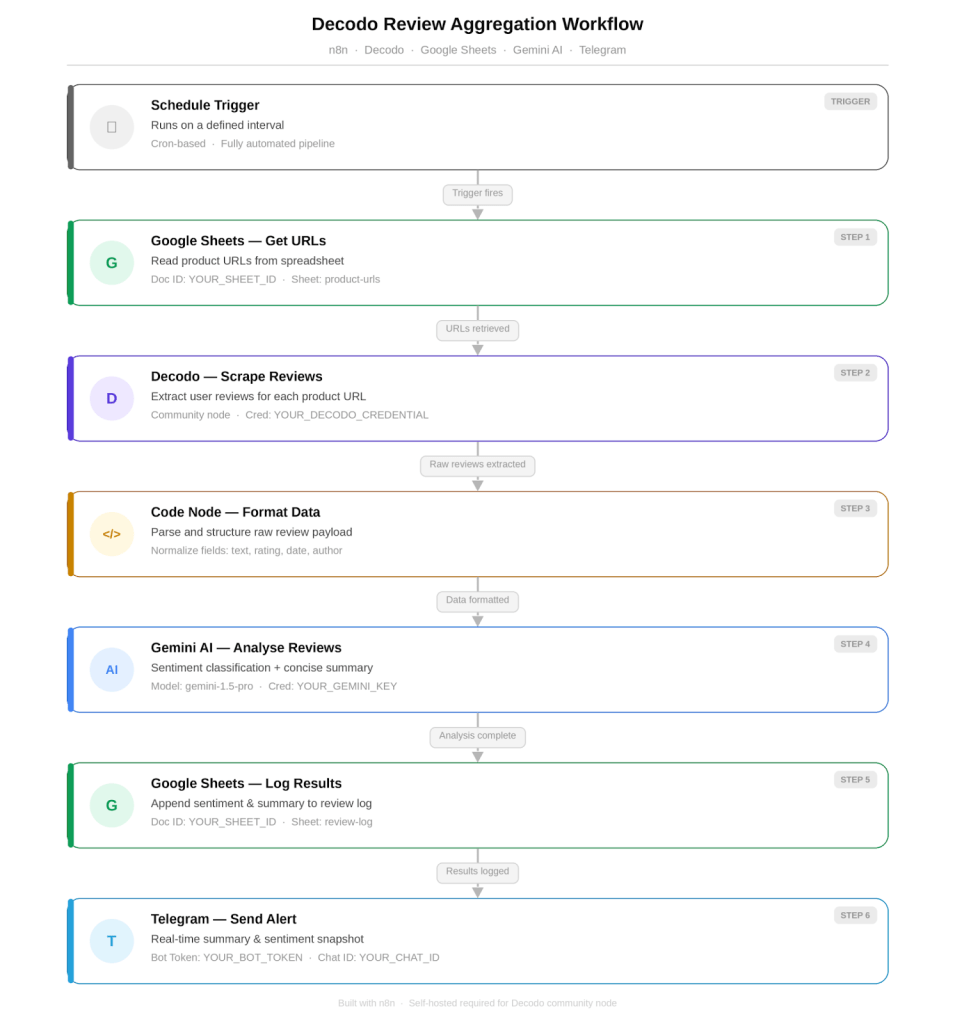
This automation continuously monitors product reviews and analyzes them using AI. The workflow retrieves product URLs from Google Sheets, extracts reviews using a scraping tool, and processes the content with Gemini AI to determine sentiment and generate a short summary. Results are logged in a spreadsheet, and an alert is sent through Telegram whenever new reviews are detected, allowing teams to monitor feedback and respond quickly.
How to set up this automation
- Store product URLs in a tracking sheet
Create a Google Sheets document that contains the product URLs you want to monitor. This sheet acts as the data source that the workflow reads during each scheduled run.
- Collect reviews from each product page.
Add a scraping node connected to the review extraction service. The workflow loops through each product URL and retrieves the latest user reviews from the page.
- Process the review data for analysis.
Use a code or formatting node to organize the extracted reviews into structured text so the AI model can process the content correctly.
- Analyze sentiment and generate a summary.
Send the formatted review data to the AI model. The model classifies review sentiment and produces a summary highlighting key feedback.
- Store results and notify your team.
Append the analyzed data to a Google Sheets log, then send a Telegram notification with the summary and sentiment results.
👉 Set up this automation for free
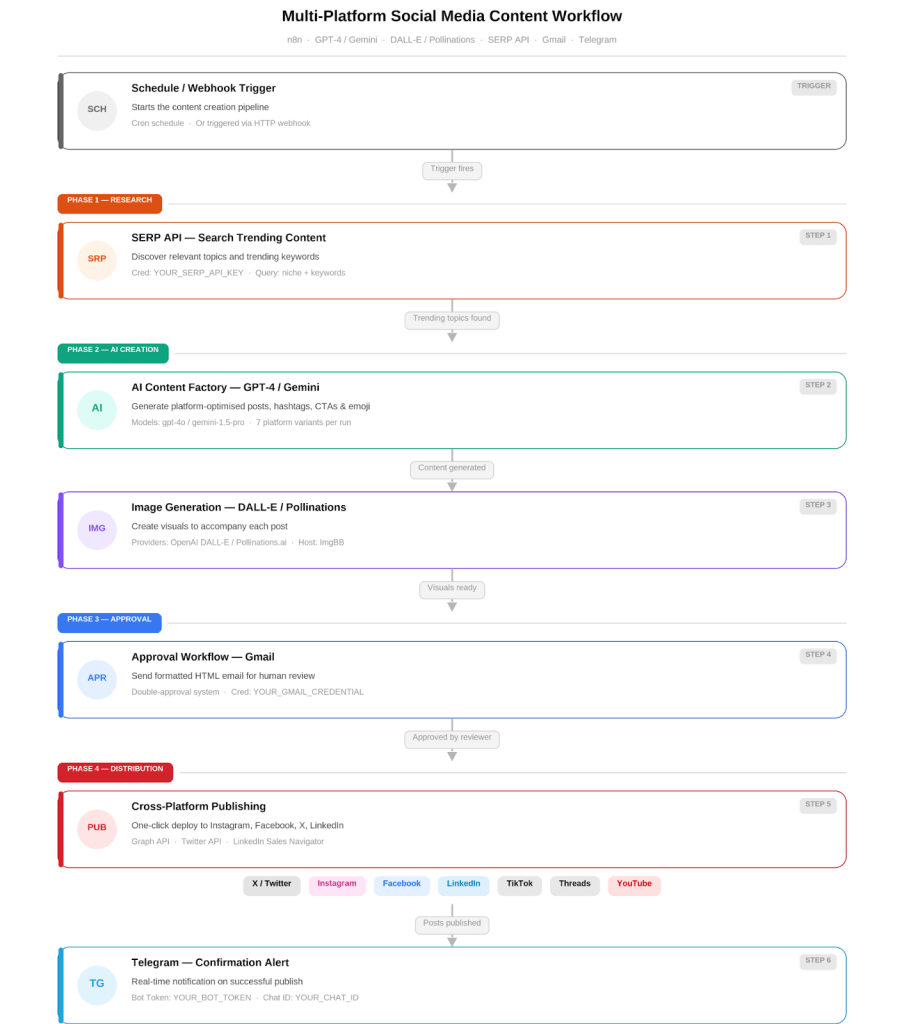
4. AI-Powered Multi-Platform Social Media Content Automation
Producing content for several social media platforms usually requires rewriting the same message in different formats. Each platform has its own character limits, tone, hashtags, and visual requirements. For marketing teams, managing this process manually can slow down content production and create inconsistencies across channels.
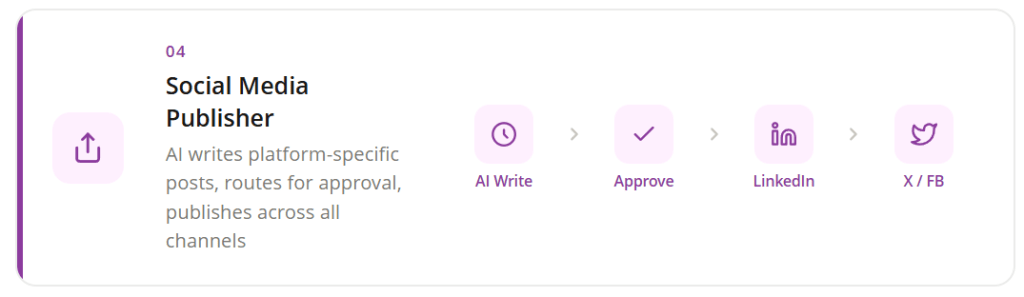
This automation helps teams generate and distribute social media content more efficiently. AI models create platform-specific posts, generate hashtags, and suggest images based on a topic or keyword. The workflow can send the generated content for approval through email before publishing. After approval, the posts are automatically published across platforms such as LinkedIn, Instagram, X, Facebook, and other social networks.
How to set up this automation
- Generate social media posts with AI.
Add AI nodes that generate content based on a topic or keyword. Configure prompts to create platform-specific captions, hashtags, and calls to action.
- Integrate tools for research and visuals.
Connect APIs that fetch relevant information or generate images to make posts more engaging and aligned with the topic.
- Create an approval step before publishing.
Add a Gmail node that sends the generated post to a reviewer. This allows teams to approve or reject the content before it goes live.
- Publish posts across multiple platforms.
Connect social media APIs such as LinkedIn, X, and Facebook. After approval, the workflow automatically publishes the content to the selected platforms.
👉 Set up this automation for free
5. AI-Driven Inventory Forecasting and Auto Purchase Orders
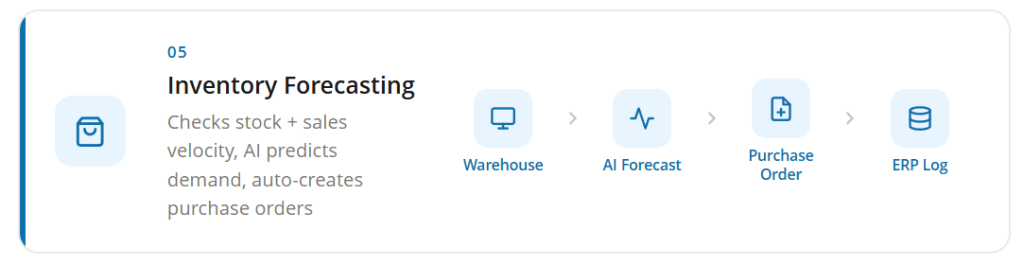
Inventory planning requires constant monitoring of stock levels and sales trends. Many businesses rely on manual checks to decide when to reorder products, which can lead to delays, stock shortages, or excess inventory.
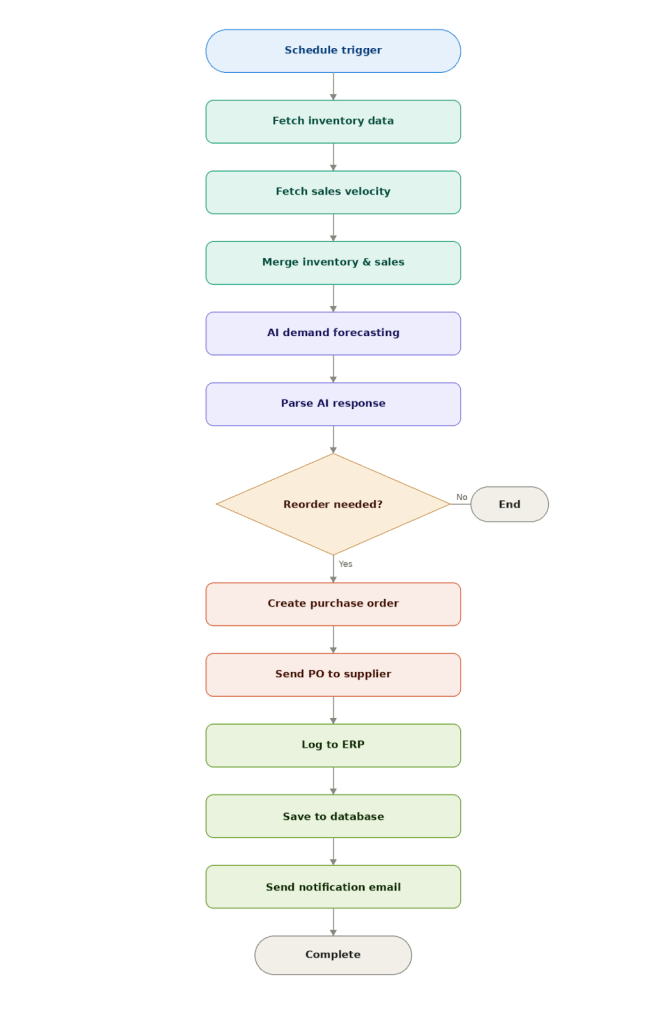
This automation continuously evaluates warehouse inventory and recent sales activity to determine when products need to be restocked. The workflow collects inventory data, combines it with sales velocity, and sends the information to an AI model to forecast future demand. If the forecast indicates a shortage, the system automatically creates a purchase order and sends it to the supplier. The order is also recorded in ERP and database systems, while notification emails inform teams about the transaction.
How to set up this automation
- Schedule regular inventory monitoring.
Add a Schedule Trigger node to run the workflow at fixed intervals, such as every six hours or once per day. This ensures the system consistently checks inventory and sales data.
- Retrieve inventory and sales information.
Use HTTP Request nodes to collect stock levels from your warehouse system and recent sales data from your sales platform or database.
- Generate demand forecasts using AI.
Send the combined inventory and sales data to an AI model that predicts future demand. The model returns recommendations on whether products should be reordered.
- Create and send purchase orders automatically.
When the forecast indicates a reorder requirement, generate a purchase order containing item details, quantities, and supplier information, then send it to the supplier through an API or email.
- Record transactions and notify the team.
Log purchase order details in your ERP system and store the records in a database such as PostgreSQL. Send a notification email with the order summary and forecast details.
👉 Set up this automation for free
6. RAG Chatbot for Company Documents
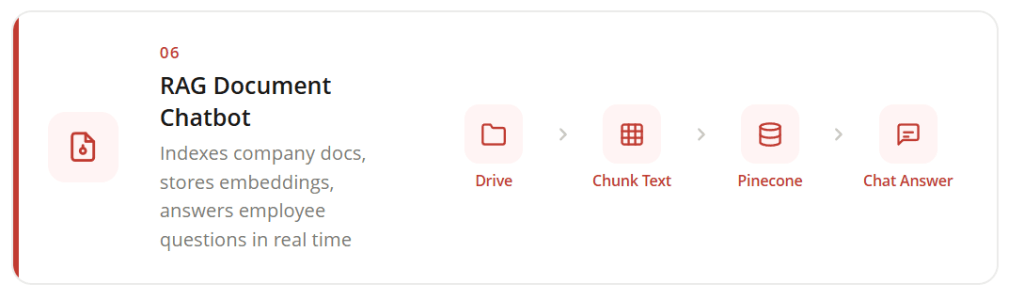
Companies often store internal knowledge in documents such as policies, training materials, and product guides. Finding the right information inside these files can take time, especially when employees need quick answers.
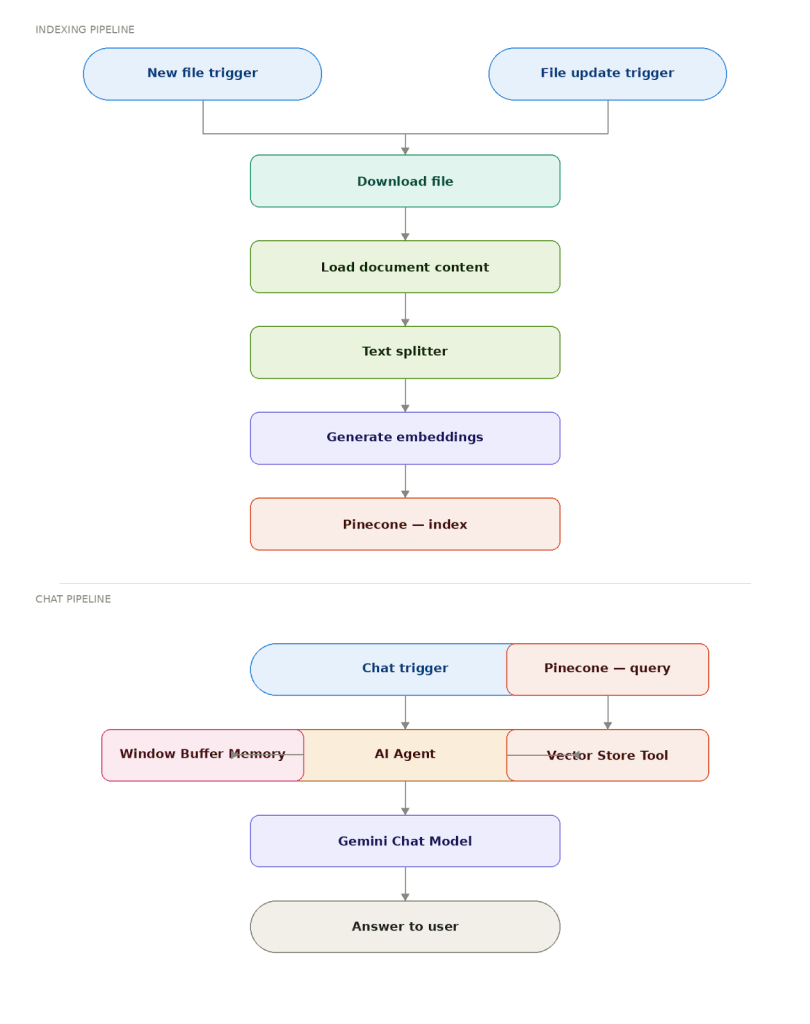
This workflow builds a chatbot that answers questions using company documents stored in Google Drive. Whenever a new document is uploaded or updated, the workflow processes the file, converts its content into embeddings, and stores the embeddings in a vector database. When someone asks a question through the chat interface, the system retrieves the most relevant document sections and uses an AI model to generate an answer. This allows employees to access accurate information from internal documents quickly.
How to set up this automation
- Monitor a folder for new or updated documents.
Add Google Drive Trigger nodes that watch a specific folder. The workflow activates whenever a file is uploaded or modified in that folder.
- Process and prepare document content
Download the file, extract its text content, and split the document into smaller sections so the information can be processed efficiently.
- Generate embeddings and store them in a vector database
Send the text sections to an AI model to generate embeddings and store them in a vector database such as Pinecone for fast retrieval.
- Answer employee questions using retrieved data.
When a user submits a question through the chat interface, the system retrieves relevant document sections and sends them to the AI model to generate a contextual answer.
👉 Set up this automation for free
7. Chat With Your Database Using AI
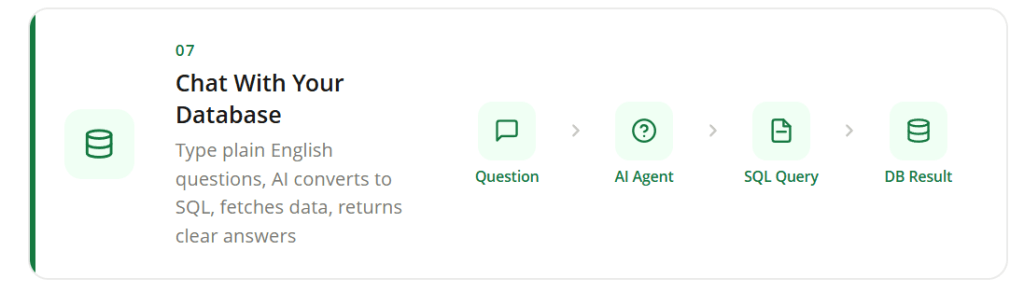
Business data is often stored in databases, but retrieving insights usually requires writing SQL queries or asking a technical team for help. This can slow down decision-making for non-technical users who simply want quick answers from company data.
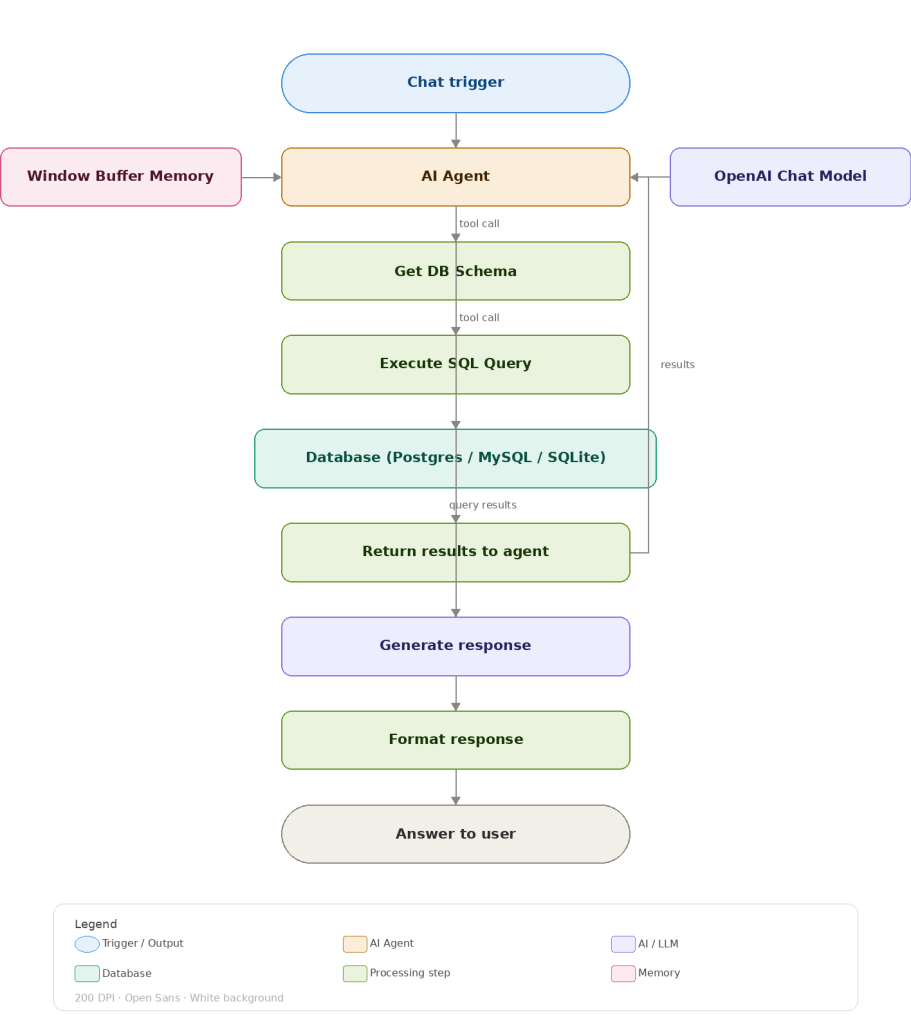
This automation creates a conversational interface that allows users to query databases using natural language. Instead of writing SQL queries, users can ask questions through a chat interface. The AI agent interprets the request, generates the appropriate query, retrieves the data from the database, and returns a clear response. This makes it easier for teams to explore and analyze data stored in systems such as PostgreSQL, MySQL, or SQLite.
How to set up this automation
- Connect the database to the workflow.
Configure a database node and provide the credentials for your database system, such as PostgreSQL, MySQL, or SQLite. This node allows the workflow to retrieve information from stored tables.
- Add the AI agent that interprets user questions.
Include an AI Agent node connected to a language model. This component converts natural language questions into structured database queries.
- Create a chat interface for user queries.
Use the built-in chat trigger to receive user questions. You can also connect external platforms like Slack or Microsoft Teams if you want employees to access the chatbot directly from those tools.
- Return database results as readable responses
After retrieving the requested data, the workflow formats the results and sends a clear response via the chat interface.
👉 Set up this automation for free
8. AI-Powered Abandoned Cart Recovery Automation
Cart abandonment is a common challenge in e-commerce. Many shoppers add products to their cart but leave before completing the purchase. Without follow-up communication, these potential sales are often lost.
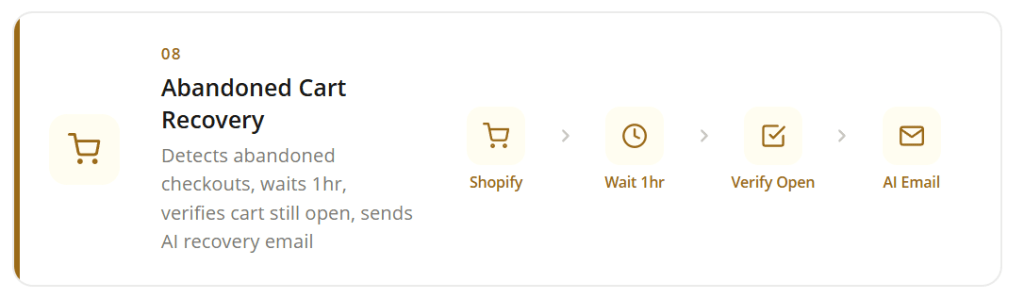
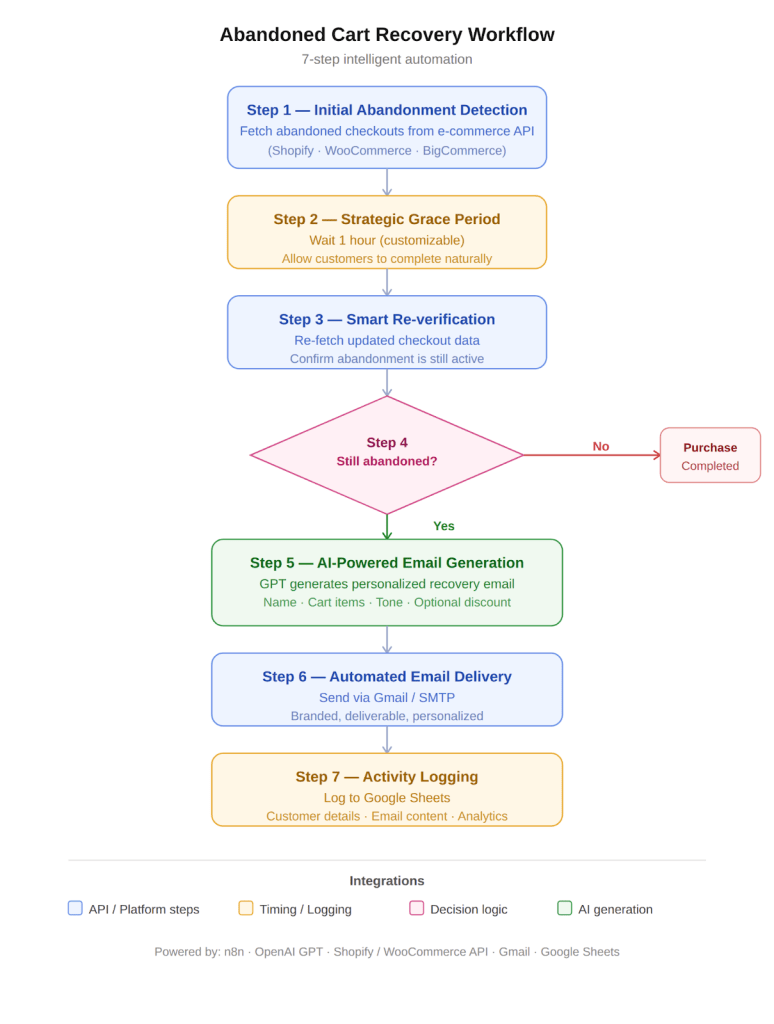
This automation monitors abandoned checkouts in your store and follows up with customers through personalized recovery emails. The workflow first detects abandoned carts from the ecommerce platform and waits for a short grace period to allow customers to complete the purchase naturally. If the cart remains abandoned, an AI model generates a customized recovery email that references the products left in the cart. The email is then sent automatically while the activity is recorded for campaign tracking and performance analysis.
How to set up this automation
- Monitor abandoned checkouts from your store.
Configure an API request node to fetch abandoned checkout data from your ecommerce platform, such as Shopify or WooCommerce. This step identifies customers who started checkout but did not finish their purchase.
- Add a grace period before sending recovery emails.
Insert a delay step that waits for a defined period, such as one hour. This prevents unnecessary emails in cases where customers return shortly after leaving the checkout page.
- Verify if the cart is still abandoned.
After the waiting period, retrieve the checkout data again and compare it with the previous list. Only customers who still have incomplete checkouts move to the next step.
- Generate a personalized recovery message.
Send customer details and cart information to an AI model that creates a tailored email mentioning the products left in the cart and encouraging the customer to complete the purchase.
- Send the email and record campaign activity.
Deliver the recovery email using an email service and log the event in a tracking sheet to measure performance and recovered revenue.
👉 Set up this automation for free
9. Predict Customer Churn Risk and Trigger Retention Actions
Customer churn often happens gradually through signals such as declining product usage, unresolved support issues, or billing problems. Without monitoring these signals, companies may not realize the risk until the customer has already left.
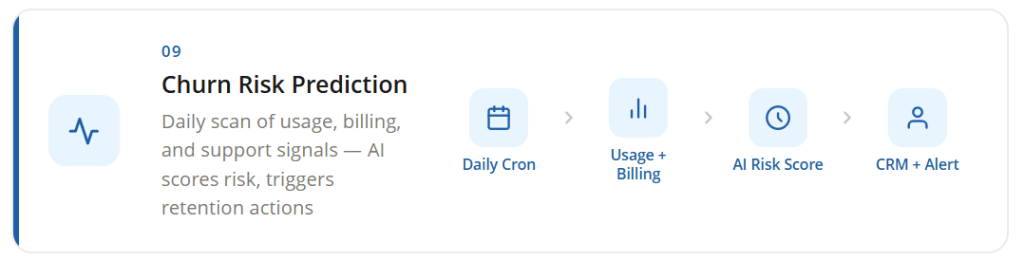
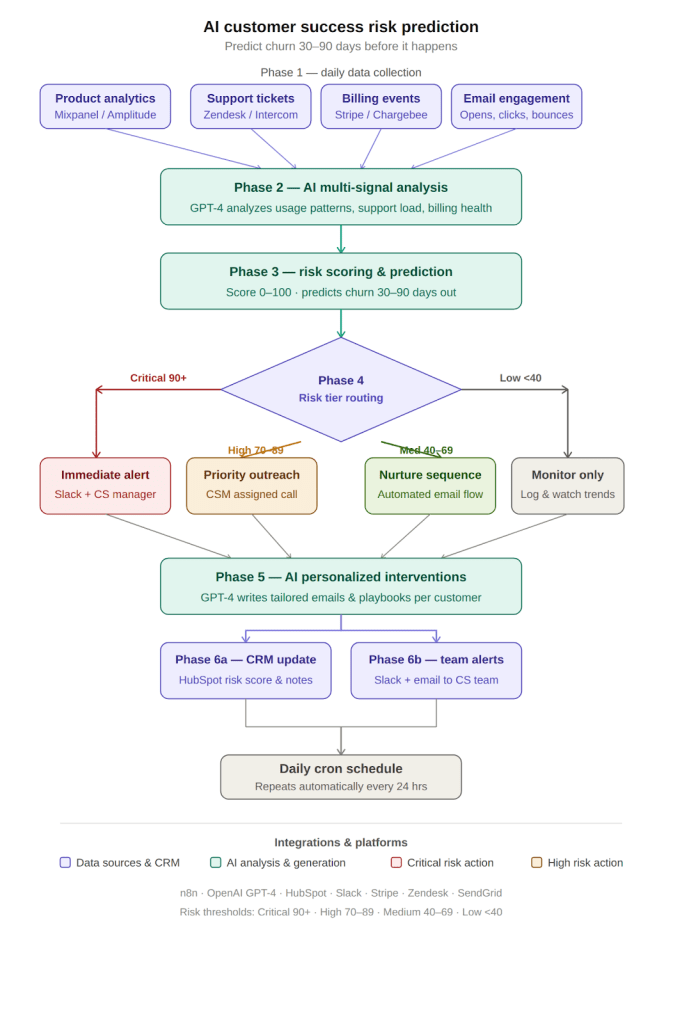
This automation continuously evaluates customer behavior and identifies accounts that may cancel their subscription or stop using the product. The workflow gathers data from analytics tools, support systems, billing platforms, and CRM records. An AI model analyzes these signals to calculate a churn risk score and predict potential churn 30 to 90 days in advance. Based on the risk level, the system generates personalized retention messages, updates CRM records, and alerts the customer success team.
How to set up this automation
- Schedule daily customer data analysis.
Add a Cron node that runs the workflow automatically each day. This ensures customer behavior signals are evaluated regularly.
- Collect activity and support data from connected systems
Use API nodes to retrieve usage analytics, support ticket activity, billing information, and CRM data for each customer account.
- Analyze churn risk using AI.
Send the combined customer data to an AI model that evaluates engagement patterns and calculates a churn risk score.
- Generate personalized retention actions.
Based on the risk score, the workflow prepares tailored intervention messages such as support outreach, discounts, or onboarding assistance.
- Update CRM records and notify the team.
Store the churn risk score in your CRM and send alerts to the customer success team through email or messaging tools so they can act quickly.
👉 Set up this automation for free
10. Automated Content Research Using Reddit Data and AI
Online communities often reveal real customer problems, product feedback, and trending topics. Platforms like Reddit contain valuable discussions where users openly share frustrations, questions, and opinions about products and industries. Manually tracking these conversations across multiple communities can be time-consuming.
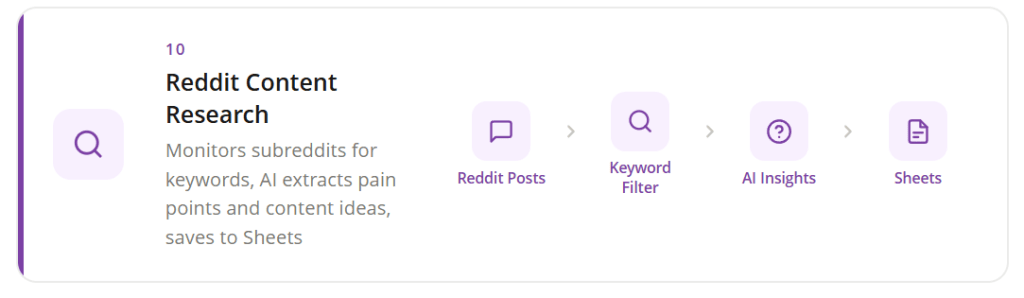
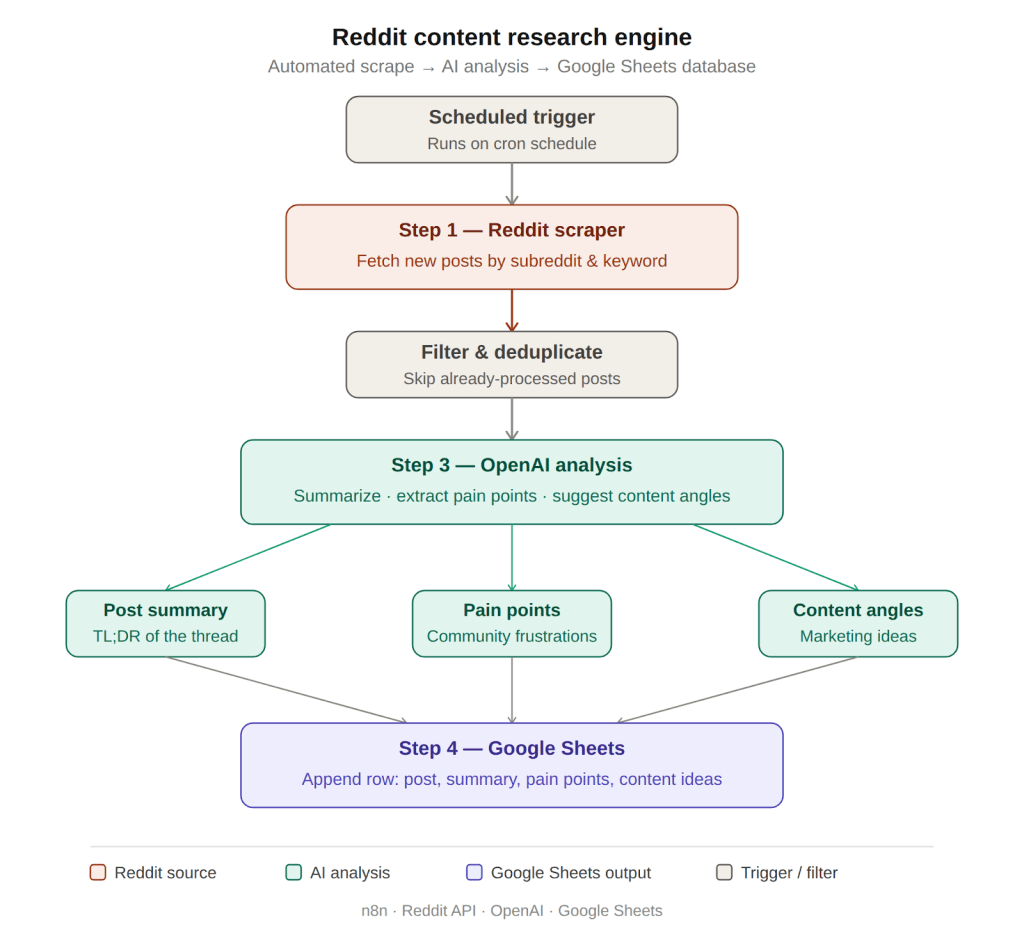
This automation collects new posts from selected subreddits and keywords, then analyzes the content using AI to identify insights. The workflow extracts summaries, common pain points, and potential content ideas from the discussions. These insights are automatically stored in a Google Sheets database where marketers and product teams can review them. As a result, teams gain a continuous stream of real audience insights for content planning and research.
How to set up this automation
- Track discussions from selected subreddits
Configure a Reddit node with the subreddits and keywords you want to monitor. The workflow will search these communities to collect new posts related to your topic.
- Send the collected posts for AI analysis.
Pass the Reddit content to an AI model that summarizes each post, identifies user pain points, and suggests potential content ideas.
- Structure the extracted insights
Use data formatting nodes to organize summaries, topics, and insights into a structured format suitable for storage in a database.
- Save research insights in a central sheet.
Append the processed data to a Google Sheets document where teams can review discussions, trends, and potential content opportunities.
👉 Set up this automation for free
Final Words
Automation works best when it connects with the right systems and expertise.
n8n gives small businesses the flexibility to build powerful workflows. But real impact comes when these automations align with your business goals, scale with your growth, and integrate across your tech stack.
This is where a partner like RAAS Cloud makes the difference.
With 60+ completed projects, 50+ skilled experts, and experience across 500+ global companies, RAAS Cloud helps businesses design, build, and scale automation systems that deliver real results.
Start small. Automate one workflow. Then scale with the right support. Explore AI consulting services by RAAS Cloud and build smarter systems with automation.

Dhanalakshmi Kadirvelu is a Business Intelligence and Data Analytics expert with a strong focus on software development and data engineering. She creates efficient data models, builds interactive dashboards, and integrates analytics into software systems using Power BI, OBIEE, and SQL. Her work helps development teams use data effectively to create smarter software solutions and improve business performance.