

Many software rollouts fail due to unclear ownership, poor user adoption, and a lack of rollback safeguards.
These issues cause downtime, resistance, and low ROI from even well-built systems.
In this guide, you will learn how to plan and execute a successful software rollout and how RAAS Cloud helps you deal with common rollout challenges.
What is software rollout?
A software rollout is the structured process of introducing new software, or a major update, to its intended users across an organization or customer base.
It involves planning, testing, communication, training, and phased deployment to ensure smooth adoption with minimal disruption. Unlike simple software deployment, which focuses on technical installation, a rollout addresses user readiness, change management, and ongoing support.
The goal of a software rollout is to ensure the new system is fully adopted, performs as expected, delivers its intended business or operational benefits, and maintains stability and user confidence throughout the transition.
💡 BEFORE WE START:
If your organization is preparing for a major software rollout or upgrade, our software development services can help you plan and execute it smoothly (Completed 60+ successful projects).
What does a software rollout strategy include?
A software rollout strategy includes all the technical, operational, and user-focused elements required for a controlled release. It covers deployment design (e.g., blue-green, rolling, or canary), testing and validation steps, rollback procedures, and monitoring protocols to ensure system stability.
It also includes change management, communication plans, and training schedules to prepare end users for adoption. Supporting components such as data migration plans, access controls, and post-launch support models are also defined.
Together, these elements ensure the rollout is executed safely, users are informed and equipped, and the new software performs reliably in production without service disruption.
What are the key differences between software deployment and software rollout?
1. Deployment gets the software live; rollout gets it used
Software deployment is the technical act of pushing code or configuration into a production environment so the system runs as intended.
A software rollout begins after deployment, ensuring the software actually reaches its users, integrates with daily workflows, and delivers value. Deployment puts the system online; rollout makes it operationally successful.
2. Deployment changes infrastructure; rollout changes behavior
Deployment updates servers, databases, or cloud environments. It’s a technical operation managed by DevOps engineers.
Rollout changes how teams work, requiring user training, documentation, and communication. It introduces new processes and behaviours, ensuring people know why and how to use the tool effectively.
3. Deployment is instant; rollout is gradual and staged
A deployment can happen in minutes through automated CI/CD pipelines.
Rollouts, however, are phased: starting with a pilot, then expanding to departments, regions, or “rings.” This gradual exposure helps catch issues early and manage risk while users adapt to the new system.
4. Deployment ensures system stability; rollout ensures business stability
A deployment is considered successful when servers are up, integrations work, and no errors occur.
A rollout succeeds when users adopt the system, workflows stabilize, and productivity remains unaffected. Deployment checks technical health; rollout ensures operational continuity.
5. Deployment is led by engineers; rollout is owned by cross-functional teams
Deployment is primarily the responsibility of developers and DevOps engineers who manage builds, pipelines, and version control.
A rollout involves cross-functional coordination, IT for infrastructure, HR or L&D for training, operations for adoption, and management for communication. It’s both a technical and organizational change effort.
Follow These 8 Steps For A Successful Software Rollout Plan
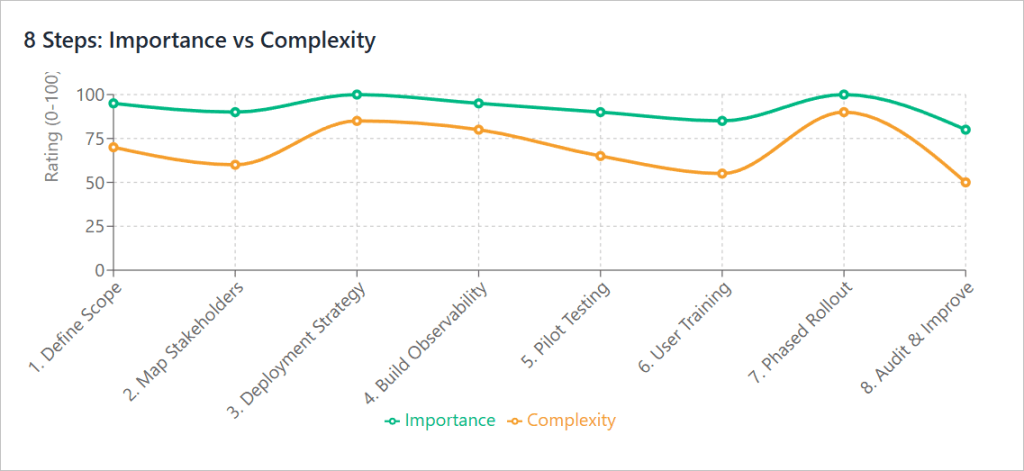
Step 1: Define scope, objectives, and measurable outcomes
It defines the strategic purpose behind the rollout. It establishes what is being launched, why it matters, and what success looks like in quantifiable terms.
What’s done exactly:
The rollout lead outlines the features, integrations, and dependencies that will go live. The team identifies impacted users and business functions, sets performance and adoption KPIs, and creates a project timeline with clear approval gates. All definitions are recorded in a single scope document shared across teams.
How important it is:
A well-defined scope anchors the project. It prevents last-minute feature additions, ensures alignment between business and engineering, and establishes measurable benchmarks for evaluating post-launch success.
Step 2: Map stakeholders and assign ownership
It establishes who is responsible for every part of the rollout and ensures cross-functional alignment from day one.
What’s done exactly:
The project manager identifies all contributors, including engineering, DevOps, QA, IT, training, communications, and support. A RACI chart assigns exact responsibilities for deployment, training, escalation, and maintenance. Each department appoints a “champion user” to act as the liaison for real-time feedback and user support.
How important it is:
When every task has an owner, accountability becomes unambiguous. It reduces delays, streamlines communication, and allows faster troubleshooting when issues occur during rollout.
Step 3: Select deployment strategy and prepare rollback mechanisms
It defines how the software will technically reach production and how teams will restore stability if something fails.
What’s done exactly:
The engineering team evaluates and selects a deployment model: Blue-Green for zero downtime, Canary for gradual exposure, or Rolling for distributed updates. They automate rollback scripts, validate backups, and rehearse recovery scenarios using mirrored test environments. Database checkpoints and configuration snapshots are stored before rollout begins.
How important it is:
Controlled deployment and pre-tested rollback plans protect uptime. They ensure that, even in failure scenarios, teams can quickly restore normal service without affecting user data or experience.
Step 4: Build observability and validate system reliability
This step transforms the system into a fully visible and measurable environment, enabling the team to detect, isolate, and resolve issues instantly.
What’s done exactly:
Monitoring tools such as Prometheus, Datadog, or Grafana are configured to track key metrics including CPU, memory, latency, and error rate. Log aggregation and tracing pipelines are implemented. Load and stress tests simulate peak usage conditions to validate that the infrastructure can handle real-world demand. Alerts are configured for early anomaly detection.
How important it is:
Observability reduces uncertainty. It allows engineers to detect failures in minutes rather than hours, ensuring rollout stability and rapid mean-time-to-recovery (MTTR).
Step 5: Pilot the rollout with a controlled user group
This step validates the new software in a live but limited environment, ensuring both technical readiness and user adaptability.
What’s done exactly:
The rollout team selects a small segment, typically a single department or region, to test the system first. Real user interactions are monitored closely for bugs, usability issues, and workflow misalignments. The team collects feedback, refines configurations, and updates documentation before expanding the rollout.
How important it is:
Pilot testing uncovers practical challenges that no internal QA can replicate. Fixing these issues early prevents large-scale disruption when the software is rolled out organization-wide.
Step 6: Deliver contextual user training and internal enablement
This focuses on preparing users for real operational scenarios rather than theoretical features.
What’s done exactly:
Trainers design task-based modules aligned with each user’s day-to-day responsibilities. Teams receive access to sandbox environments for safe, hands-on practice. Quick-reference job aids, 2-minute walkthrough videos, and troubleshooting guides are distributed. Department “super users” stay on standby to support colleagues post-launch.
How important it is:
Practical, context-driven training accelerates user confidence and minimizes early-stage friction. It converts potential rollout resistance into active engagement and smoother adoption.
Step 7: Execute a phased rollout with active performance tracking
It controls the rollout pace, balancing progress with system stability through incremental exposure and continuous measurement.
What’s done exactly:
Deployment begins with a small percentage of users, typically 10–15%. Real-time dashboards monitor application latency, request failures, and user session activity. Feedback loops between DevOps and support teams drive rapid fixes. Once KPIs stabilize, the next user batch is activated until full rollout completion.
How important it is:
Phased rollouts reduce risk by catching issues early. They safeguard uptime, limit user impact, and give the team full control over the rollout velocity.
Step 8: Audit outcomes and formalize continuous improvement
It verifies that the rollout delivered its intended value and turns lessons learned into operational improvements.
What’s done exactly:
Teams compare pre-defined KPIs with post-launch performance data, including uptime, adoption, task completion time, and ticket volume. A structured post-rollout review identifies technical and process improvements. Updated SOPs, checklists, and automation scripts are archived to improve future rollouts.
How important it is:
This phase closes the learning loop. Documented insights reduce repeat errors, strengthen future rollout efficiency, and demonstrate tangible ROI from the implementation effort.
💡 FURTHER RESOURCES
- How Much Does It Cost To Hire Python Developers
- How to Do Software Development Outsourcing Without Risking Quality?
- 50+ Important Software Development Statistics
What are the common rollout challenges, and how RAAS Cloud solves them
Here are the common challenges and their impact based on our years of design and development experience:
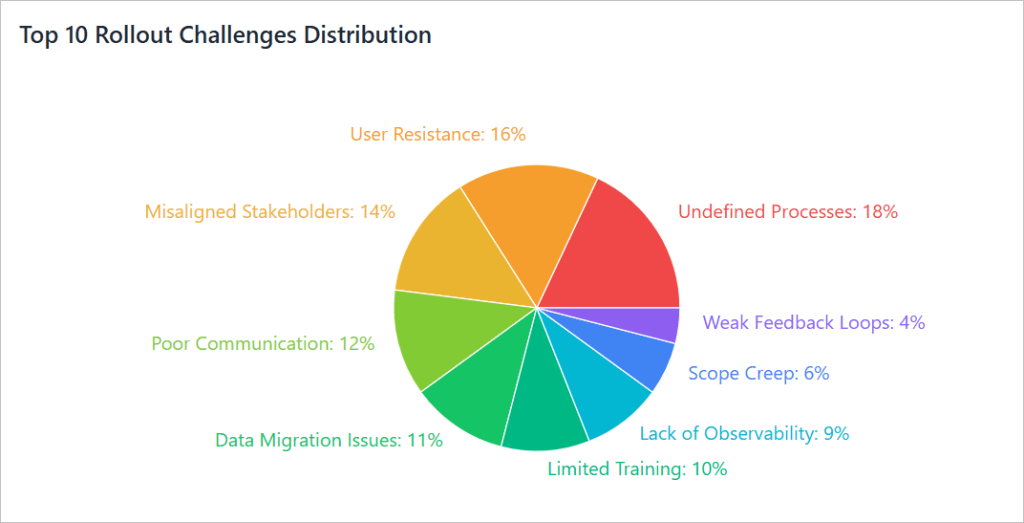
1. Undefined or changing business processes
Many organizations roll out software while still figuring out how their internal processes should work. When workflows, SOPs, or approval chains aren’t finalized before configuration, teams constantly rewrite logic mid-rollout, causing mismatched data, broken automation, and project drift.
2. Resistance to change among users
Even the best system fails if people won’t use it. Field staff or non-technical teams often see new tools as a management experiment rather than a necessity. Fear of doing things wrong or lack of clarity on “what’s in it for me” leads to slow adoption and passive resistance.
3. Misaligned stakeholders and a lack of ownership
A rollout touches multiple departments: IT, operations, finance, HR, and leadership. Without clear role assignments and decision authority, accountability gets blurred. Teams work in silos, leading to delays, duplicate tasks, or inconsistent configurations across departments.
4. Insufficient communication and change management
Rollouts often fail because users hear about the new system only days before launch. When communication starts late, employees don’t have time to mentally or technically prepare. The absence of a structured change management plan causes confusion, anxiety, and rumor-driven resistance.
5. Poor data migration and integration issues
Legacy data is messy with duplicates, incomplete records, and inconsistent formats. Rushing migration without validation causes errors that surface only after go-live. Missing integrations with existing tools (such as CRM or ERP systems) also force users into manual workarounds that undermine automation benefits.
Most rollout failures stem from unclear ownership, poor adoption planning, and missing rollback safeguards.
This is where RAAS Cloud bridges these gaps through its full-cycle software development and deployment expertise.
Our team aligns processes before code deployment, ensuring workflows and SOPs are clearly defined. Using proven rollout frameworks, we assign accountability across IT, operations, and support teams to maintain control during every phase. RAAS Cloud’s custom software development, API integration, and cloud migration services reduce technical friction, while our built-in observability and rollback modules safeguard uptime.
To drive user adoption, we combine change-management strategies with role-based training and ongoing support analytics. The result is a rollout that’s stable, measurable, and easy to scale.
With RAAS Cloud, businesses gain a rollout partner that integrates precision engineering with seamless user transition, turning complex launches into predictable, low-risk deployments.
You can contact our team for a free software design and development proposal.

Dhanalakshmi Kadirvelu is a Business Intelligence and Data Analytics expert with a strong focus on software development and data engineering. She creates efficient data models, builds interactive dashboards, and integrates analytics into software systems using Power BI, OBIEE, and SQL. Her work helps development teams use data effectively to create smarter software solutions and improve business performance.